• The PlayStation 4 has kept its appearance under wraps so far, but at E3 it's finally shown its face...and its price: $399, which undercuts Microsoft's Xbox One by $100.
    The PlayStation 4 was originally announced at an event in New York City back in February, during which we heard lots of details about features and strategy but didn't glimpse the system itself -- just its new controller.

    (Credit: CNET)
    Now that it's been revealed, we know that it's: a black box. In fact, it not only looks like a PlayStation 2 on steroids, but it bears more than a passing resemblance to the equally portly and piano-black Xbox One.

    Finally, the PS4 (pictures) 


    About that design: the angled parallelogram design of the PS4 clearly conjures PlayStations of the past, most clearly the PlayStation 2. It's an attractive look, but it's boxy; it doesn't seem nearly as big as the Xbox One, however.

    The PS4, revealed.
    (Credit: Sony Computer Entertainment)
    Also, box design really means nothing. But, hey, at least we know what it'll look like next to our television, and it's fine-looking without being obtrusive.
    Used games: Yes
    The PlayStation 4 will support used games and won't need to be online in order to play games. Both of these issues have reared their head on the Xbox One.
    (Credit: Sony Computer Entertainment)
    PlayStation Plus and PS4: Free games
    The PS4 will support the same PlayStation Plus service as the Vita and PS3, with no new subscription price increase: it's all folded together.
    The PS4 will have its own Instant Game collection service; Drive Club PS Plus Edition will be the first free game at launch, with one free game a month after that. Titles will include Don’t Starve and Outlast.
    Sony’s been smart to offer up free games via Plus, and you have to wonder if Microsoft is taking notice: a similar offering of free monthly games was announced for Xbox 360 owners subscribing to Xbox Live Gold.
    (Credit: Sony Computer Entertainment)
    Video content and services
    Leading off the PS4 discussions at E3 was a mention of Sony's video efforts, seemingly aiming for a similar type of video-content approach with the console as Microsoft is with the Xbox One. Sony touted its studio strength and the eventual launch of exclusive videos coming only to the PS4, but it’s unclear what those are.
    Video services like Video Unlimited, Redbox, and Flixster are some of the services launching on the PlayStation Network, but it looks like these services will be available on the PS3, too.
    The big challenge with fronting content as a reason to buy a console is this: can game systems really become video networks? Microsoft and Sony seem to be betting on this direction, and it’s a dicey endeavor.
    Gaikai and cloud streaming
    Gaikai cloud technology, acquired last year by Sony, was discussed back in February as a possible trial-based way of playing games before buying, working via streaming-game technology. Back then, David Perry, CEO of Gaikai, discussed the many ways that PlayStation Cloud services will potentially reinvent the back end of the PlayStation experience.
    Gaikai technology will also be used to power the PS4's spectating experiences, and that aforementioned ability to continually one-button broadcast your game progress via Share. It's certainly the first time a home gaming console has entered this territory, although PC gamers have enjoyed similar types of functions and services (OnLive, for instance). The streaming/sharing technology will also work with Facebook and Ustream.
    It doesn't seem to be coming this year, though. Sony announced at E3 that the PlayStation’s cloud gaming service will be available in 2014, offering PS3 games streamed via the cloud. The service will start in the U.S. first. And, interestingly, Gaikai services won't be limited to the PS4; the PS3 and eventually the Vita will benefit from Gaikai as well.
    New games
    Sony demonstrated games at E3 -- as you’d expect -- in a mix of new IP and sequels: The Order, Killzone: Shadow Fall, and Infamous: Second Son, and The Dark Sorceror. Some of these were teased back in February at Sony’s last event. It was hard to glean, just like before, what advantages the PS4 was offering these games that the PS3 couldn’t accomplish, but for the most part these games looked pretty.
    Sony's also pledging massive third-party support, and a very easy process for independent developers to publish on the PS4.
    More to come, but read below on details from the New York event. This post will be updated.
    (Credit: Sony Computer Entertainment)
    Hardware
    The PlayStation 4, as you'd expect for a seven-years-later follow-up, has impressively bumped specs:
    • An eight-core X86 AMD Jaguar CPU
    • 1.84-teraflop AMD Radeon graphics engine (with "18 compute units")
    • 8GB of GDDR5 memory
    • Hard-drive storage (not SSD)
    • Blu-ray drive
    • Three USB 3.0 ports
    • 802.11 b/g/n Wi-Fi
    • Ethernet, HDMI, Bluetooth 2.1, optical audio and analog AV out
    The PS4 will use a hard drive for storage versus an SSD, but the included capacity in the box (and whether it'll be as easily swappable as the PS3's hard drive) hasn't been specified. The specs overall match that of a modern PC with integrated AMD processors and graphics, or so it seems. It's not a particularly stunning set of specs for a PC, but it's far ahead of any existing game console. It's just not as ahead-of-its-time on the hardware end as the original PlayStation 3 seemed to be.
    Immediacy of response reducing lag time while accessing content is also one of the promised PS4 features (unlike the extremely laggy Wii U, perhaps). The PS4 will allow speedy background downloading, and Sony claims that games will even be playable as they're being downloaded.
    (Credit: Sarah Tew/CNET)

    Yes, the PS4 will have a Blu-ray drive that can also play DVDs, although Sony curiously left any mention of that out of the presentation. According to Sony's press release issued after the event, the PS4 will also have three USB 3.0 ports, 802.11 b/g/n Wi-Fi and Ethernet, Bluetooth 2.1, HDMI, Analog AV-out, and optical digital audio output.
    What about PS3 games playing on the PS4? Sony has so far discussed PlayStation 3 gameplay on the PS4 under the same umbrella as playing PlayStation 1 and PS 2 games, via a digital library in a yet-to-be-determined PlayStation Cloud Service. Whether this would be accomplished via streaming, digital downloads, or emulation wasn't specified, but it sounds like Sony's answer to the Virtual Console.

    The DualShock 4 controller.
    (Credit: Sarah Tew/CNET)

    DualShock 4 and the new PS Eye: Touch and move
    The new DualShock 4 controller is one of the few parts of the PS4 that there are actual pictures of. Much like the advance rumors, it feels like a fusion of the PlayStation DualShock with some of the design philosophies of both the Vita and the Move. It has enhanced rumble, a touch pad, a "Share" button, a standard headphone/microphone jack that will accept standard headphones, and light-up bar that looks like a transplanted top of a Move wand. The two-finger touch pad with click, located right in the middle of the controller, has the same look as the pad on the back of the PS Vita handheld. The DualShock 4 also has a Micro-USB port, Bluetooth 2.1, and Sixaxis gyroscope/accelerometers.
    The PlayStation 4 Eye has also been redesigned: instead of the single Webcam-like lens setup before, the new almost Kinect-like bar has stereo cameras, and works with the light bar for motion controls. It comes packed in with the PlayStation 4.

    Sony finally unveils PS4 (pictures)


    Scroll Left
    Scroll Right
    (Credit: Sarah Tew/CNET)

    Online: The new social sharing
    Sony promises that you'll be able to scan the last few minutes of your gameplay with the push of a "Share" button on the DualShock 4, uploading screenshots or clips, and even spectate and chat during other people's games like PC gamers already do. Many screens shown at the PlayStation event show what looks like a serious revamp of Sony's social gaming network, using what look like real photos and names for players. Whether or not video game footage-sharing is a feature with mainstream appeal has yet to be determined.
    (Credit: Sarah Tew/CNET)

    Can the Vita and PS4 be best friends? Sony promises that the Vita will be very integrated with the PS4, and the two will be wonderful together using Remote Play game-streaming. It sounds somewhat like what the Nintendo Wii U enables on the GamePad, except in this case the experience will be translated onto a fully independent handheld device.
    (Credit: Sarah Tew/CNET)

    If this works as promised, it could help make the PS4 and Vita a hardware match worth getting -- improved transmission times between the Vita and PS4, as promised, result in an experience as seamless as what Nintendo achieves on the Wii U GamePad. Sony's aiming to have most PS4 games be Vita-playable via remote play. No further details were given; apparently, that will be discussed "later in the year," too.

    Cell phones, tablets...second screens, too?
    Whether phone, PC, or portable gaming device, Sony also made big promises regarding integrated gaming that will follow you wherever you go. What that actually entails -- an app, social gaming, or something like true game streaming -- wasn't clearly defined, either, but it sounded like Sony's continuing attempt to broaden PlayStation support via Sony tablets, phone, and electronics. It's important to note that other game consoles like the Xbox 360 already allow this type of integration via certain apps, and many games do as well.
    The core social elements of the PS4 are being promised to work on smartphones, tablets, and the Vita as well -- on stage, the clean-looking social browser was shown on various devices, including streaming video of gameplay.
  • Apple has unveiled the latest version of its mobile operating system, saying iOS 7 is the most significant update since the original iPhone.
    Apple claims iOS 7 is completely redesigned with a new user interface and a number of new features, including enhancements to multi-tasking, imaging, browsing, sharing and security.

    “It’s about bringing order to complexity,” said Jony Ive, Apple’s senior vice-president of design.
    “IOS 7 is a clear representation of these goals. It has a whole new structure that is coherent and applied across the entire system.”
    The new operating system has been used to introduce iTunes Radio, a free internet radio service based on the music users listen to on iTunes.
    IOS 7 also introduces Control Center, which brings all the controls users want to access quickly into one place.
    A swipe from the bottom of a screen gives users access to controls for Airplane Mode, Wi-Fi, Bluetooth, screen controls and music controls.

    Security enhancements include iCloud Keychain, which is designed to store passwords and credit card information securely and make this available to users on all iOS devices.
    Control Center also provides access to apps such as Clock, Camera, Calculator and the Flashlight.

    With iOS 7, notifications are now available from the Lock screen, enabling users to see all notifications with a swipe, including weather, traffic, meetings and events.
    While Apple’s announcement emphasised innovation, competitors and some analysts suggested it has done merely what it needs to do to keep up with the market.
    Jyrki Rosenberg, vice-president of Nokia Entertainment, said: “We launched our streaming radio service in 2011. It’s interesting to see Apple react now and it seems they continue to play catch-up.
    “Nokia Music will stay true to our mobile-first approach and continue to deliver an extremely simple, personalised and contextual way to discover and enjoy music on the go.”
    Apple said the iOS 7 beta software and software development kit (SDK) are available immediately for iOS Developer Program members at developer.apple.com.
    iOS 7 will be available as a free software update for iPhone 4 and later, iPad 2 and later, iPad mini and iPod touch fifth generation in autumn.

  • Takeaway: Web-based networking toolkits often offer numerous ways to test routes, domains, and other issues that will directly affect your network.


    Network troubleshooting can run the gamut of possibilities. From hardware to software to external, uncontrollable forces, to powerful Jedi mind tricks. When you’re troubleshooting networking issues, the problem can often point toward many and varied issues. When that happens, you’ll want to have access to tools to help you diagnose the issue. One place to turn for such a tool set is the good old Internet.

    Web-based networking toolkits often offer numerous ways to test routes, domains, and other issues that will directly affect your network. I have found five solid web-based tools for you to try out. Some are free, some have a price attached; either way, they are all ready to serve.


    Five Apps

    1. DNS Stuff

    DNS Stuff is one of the more powerful network tool kits around. This particular tool isn’t free (though they have a free trial of their Professional Toolkit until August 2013), but it’s certainly one of the most comprehensive set of tools you’ll find.
    Included in the Pro Toolkit are the following: DNS Report (RFC Compliant mitigation steps), ISP Cached DNS Lookup, NS Lookup, Whois//IPWhois Lookup, Top Level Domain Lookup, SSL Examination, Abuse Lookup, Domain Inspector, URL Analyzer, and much more. DNS Stuff also presents you with your external IP address as well as an estimate of your location. With the amount of tools included in the Professional Toolkit, you should be able to troubleshoot numerous external networking issues.


    2. Network-Tools

    Network-Tools doesn’t offer nearly the plethora of tools as does DNS Stuff, but all of their tools are free for the using. Here you will find quick access to: Ping, Trace Route, Whois, Lookup, DNS Records, Blacklist Check, URL Decode/Encode, Email Test, and more.
    The Express test will give you the fastest results as it does a combo of Traceroute, DNS, and Whois testing. The report back from that test will often give you the information you need to immediately begin your first steps of troubleshooting the external connection to your route.


    3. DNS Inspect

    DNS Inspect is the tool you want if you’re looking for a fast, free solution that will run fifty tests with a single click. Tests include: IPv6, SOA (Mnam, Rnam, and more), multiple NS tests, multiple MX test, A record tests, glue checks, AAAA records, stealth name servers, hostname, CNAME, mail greeting, accepts postmaster address, WWW tests, and much more. The final report is given a grade and is laid out in such a way that it’s easy to spot warnings and failures.


    4. Mr.DNS

    Mr.DNS offers plenty of the standard tools (DNS lookup, DNSSEC lookup, multi-RBL lookup, SMTP test, SPF validation, etc); but it offers one tool that I really think makes it stand out. That tool is the visual traceroute. With this tool you get map of the location of the IP address as well as the route (with clickable addresses that give you information about each hop made between you and the server. The only caveat is that they don’t offer a “single click” test that generates a full-blown report for all of the tests.


    5. MXToolbox Supertool

    MXToolbox Supertool runs a number of tests on your mail server. This test will check DNS, MX records, blacklist, traceroute, SMTP diagnostics, and much more. Once the test is done, there will be clickable links to explain the results as well as what can (or should) be done to reach a resolution. The real power with Supertool comes after you’ve run the main check on the domain (or IP address). Once the main test is complete, you will be offered a number of links that will run specific tests on the address - that is the meat and potatoes of the MXToolbox Supertool.


    Bottom line

    There is no such thing as having too many tools at the ready. And when you need to have a web-based test, it’s good to have choices. And even if you only come out of this with one or two additional tools for you network administrator’s toolkit, you are that much further ahead of the game. You might already have your go-to network admin tool; but having options might be the thing that saves the day.

  • Most people have heard of malicious software as a way to hack into an iPhone, but what about a malicious charger?
    Three researchers with the Georgia Institute of Technology say they have come up with a proof-of-concept malicious iPhone charger that lets them hack into the mobile device running the latest version of Apple's iOS in less than one minute. No jailbreaking required.

    "Apple iOS devices are considered by many to be more secure than other mobile offerings. In evaluating this belief, we investigated the extent to which security threats were considered when performing everyday activities such as charging a device," the researchers wrote in a presentation summary. "The results were alarming: despite the plethora of defense mechanisms in iOS, we successfully injected arbitrary software into current-generation Apple devices running the latest operating system (OS) software."

    Dubbing their charger "Mactrans," the researchers say they can get around Apple's security mechanisms by hiding the charger software in the same way Apple hides its own built-in apps. Apparently, the hardware for the Mactrans is small enough to fit in power adaptors, docking stations, and external batteries.

    The researchers plan to present the Mactrans at the upcoming Black Hat security conference in July.


  • iPhone and Android users will gain access to mobile giant BlackBerry's popular messaging service BlackBerry Messenger (BBM) for the first time this summer, the company has announced.

    More than 51 million BlackBerry users communicate daily via BBM, one of the earliest mobile chat tools to give users a free and private means of staying in touch over the internet.

    Andrew Bocking, an Executive Vice President at BlackBerry said in a blog post: "For BlackBerry, messaging and collaboration are inseparable from the mobile experience, and the time is definitely right for BBM to become a multi-platform mobile service.

    "BBM has always been one of the most engaging services for BlackBerry customers, enabling them to easily connect while maintaining a valued level of personal privacy. We’re excited to offer iOS and Android users the possibility to join the BBM community."

    BBM will compete with other free messaging services already available to smartphone users running the iOS and Android operating systems, including WhatsApp and Viber.

    The necessity of a personal PIN to use BBM, supplied with BlackBerry's phones and shared only with contacts with whom users wish to communicate, is one of BlackBerry smartphones' most attractive aspects.

    Mr Bocking's comments may imply the BBM PIN will remain a feature in the apps now being developed for iOS and Android.


    iOS 6, the operating system run by iPhone and iPad, and Android's Ice Cream Sandwich smartphone software will be the first to run the free app, according to the Business Insider website.


    Another motive of attracting more users to Blackberry and its BBM, just after the launch of the Blackberry Q5 - (A budget version of Blackberry's flagship Q10 device , a smartphone targeted at emerging markets in Asia and the Middle East.)


  • In five and a half years, Android has come from nowhere to crush Apple and Microsoft in the mobile device market. How long until PC OEMs decide to take a gamble on the winning mobile OS and load Android onto PCs?

    During the quarter, Android was the operating system powering 59.5 percent of smart devices shipped. Behind Android was Apple's iOS with a 19.3 percent market share, and Microsoft, with 18.1 percent.
    And it is tablets that are driving this growth, not smartphones, and definitely not notebooks. Over the period, worldwide tablet shipments increased by 106.1 percent year on year, to 41.9 million units, and while Apple continues to be the big fish in the tablet space with a 46.4 percent share, even the iPad is not immune to Android, as it lost share for the third consecutive quarter.
    The Canalys data for the quarter speaks volumes.
    (Image: Canalys)
    But let's take this data and bake it into a pie.
    (Image: Canalys/ZDNet)
    Presented this way, it is clear that Android is crushing Apple and Microsoft in the mobile device market, putting the squeeze on not only Microsoft, but Apple, too, the company that sparked the smartphone and tablet revolutions in the first place.
    While some analysts are pondering Android's demise, I really can't see how the operating system can put a foot wrong. About the only weakness I can see is that one company — Samsung — dominates the Android landscape.
    Given Android's success in the mobile market, one has to wonder how long it will be until we see the operating system loaded onto PCs and go head to head against Windows and iOS. Given the way that buyers (consumers and enterprise alike) have embraced Android on smartphones and tablets — activations of new devices sit at 1.5 million daily, or 45 million every month — it seems logical to give consumers what they want, and put this operating system onto notebooks, convertibles, and hybrid systems.
    When it comes to PCs, neither Windows nor OS X seem to be igniting the imaginations — and opening the wallets — of consumers. Cheap (possibly in the region of $200) PCs would be just what PC OEMs need to inject a new lease of life into the stagnating market.
  • lookingaheadtoblue


    Over the past week, I've been surprised how many armchair pundits have lambasted Microsoft forits still not officially-admitted but largely expected decisions to add an optional Start Button and boot-to-desktop capability to Windows Blue.
    There've been reports claiming everything from Microsoft is doing a 180-degree reversal with Windows Blue, to others advising the Redmondians to dig in their heels and stay the current UI course with its coming Blue update.
    Windows Blue, from all leaks and tips I've received, is not a do-over. (If it were, it would take Microsoft a lot longer than nine or ten months to deliver it.) And ignoring customer confusion isn't a virtue; it's stupidity.
    This armchair pundit finds it refreshing to hear Windows honchos admit that Windows 8 isn't selling as well as they hoped and that they want to make its successor more comfortable, familiar and usable for the Windows installed base.
    In addition to the optional Start Button and boot-to-desktop options, there may be other interface adjustments in the works, according to one of my Blue tipsters. I hear the Windows team may also be tweaking the Charms to make them a bit easier to use with a mouse. There might be new built-in tutorials and in-context help coming to Blue. And word is there may be adjustments to the Start Screen designed to make Blue easier to use for Desktop users. One of my sources said some of these tweaks may not be in the Windows Blue preview release coming at the end of June, but that they still could make it into the final product.
    If any or all of these tweaks make it into the final version of Blue, it's nothing but goodness. If you're a user who likes Windows 8 already, great. Just ignore new options and keep on keepin' on. If you're someone like me -- who is still running Windows 7 on two of my three Windows devices (with Windows RT running on my Surface RT) -- maybe Blue will make you reconsider whether you might find the new Metro-centric Windows a little more palatable because of these changes.
    Before Windows 8 launched, I said I thought the operating system would face a rough road. My reasoning at the time was there were few PCs or tablets that made Windows 8 usable. And for those of us who might be interested in putting Windows 8 on existing non-touch hardware, the usability was questionable. Now that Windows 8's been out for about six months, I feel like my early inklings were true. I wouldn't call Windows 8 a disaster (with 100 million licenses sold), but I also wouldn't call it a barn-burner success.
    My biggest criticism for Microsoft in all this isn't that the company is trying to make some adjustments to improve usability with Blue. Instead, I can't but help wonder why Microsoft -- with all its telemetry information, customer satisfaction data, and beta-testing input -- still went ahead with what its Windows execs must have known full well would be a confusing and less-than-optimal experience for many Windows users.
    It's possible to project a bit by reading one of the recent blog posts of former Windows President Steven Sinofsky, who spearheaded Windows 8's development, for some insights into that question. In a May 8 post (a day after Microsoft's latest Blue disclosures), Sinofsky blogged about the damned-if-they-do/damned-if-they-don't choice that companies face when launching a disruptive technology:

  • Read This Before You Finalize It!


    As an IT professional, knowing what’s coming down the technology pipeline can be invaluable when it comes to planning and budgeting. Although nobody has a crystal ball, Gartner’s professional pulse on all things technological certainly makes the research company’s predictions worth noting.

    At a Gartner Symposium IT Expo in late 2012, the firm laid out 10 critical trends and technologies slated to impact IT for the next five years. Take note, as we explore the first five here:

    1. Organizational entrenchment and disruption.  With significant growth in IT complexity — including faster change cycles, shorter development timelines, and reduced budgets 24/7/365, global IT support is being demanded. End users are driving IT to make changes, such as appealing for access to iPads, iPhones and other smart phones. Furthermore, a “skills shift” is occurring with increasing numbers of retirees and new sets of skills required of employees.

    2. Software-defined networks.  In the coming years, Gartner believes a new way to operate networks will emerge-an OS that shifts control from individual devices to a central controller and allows configuration of the network from one place.  Likened to network virtualization, the move will make the location of a physical data center irrelevant, while also reducing the time required to provision new resources.

    3. Bigger data and storage. By 2015, Gartner says big data demand will generate 1 million jobs in the Global 1000, but only a third will get filled due to shortage of talent. Also on thehorizon:  30 to 60 percent compounded growth in data depending on the organization. Auditing, archiving, and recovery will become increasingly complex, with analytics and pattern recognition proving key. New specialized ARM-based servers will be commissioned to do specialty analytics, and clients will get relief from equipment that provides more performance in a smaller footprint, thus reducing power requirements.

    4. Hybrid cloud services.  Gartner believes that private clouds will improve agility and dominate the market. People are looking at the cloud as a way to accelerate business growth, particularly mobile apps, which could lead to hybrid environments with dozens of specialty providers, both private and public. “Hybrid data centers — with the ability to increase capability and/or capacity — will be in your future,” Gartner insists. You can move non-critical work to the cloud to free up space, resulting in incremental operating expense growth, but long-term capital spending deferral.

    5. Client and server architectures. One size doesn’t fit all, nor does one operating system. Noting that forced end-user standardization just doesn’t work, Gartner encourages companies to let people do what they want, within reason. For example, allowing tablets is a must, as well as wireless networks, instant messaging and smartphones. While the research firm says Windows 8 will surface within IT organization, it predicts that it will not be a full replacement for Windows 7 or XP.  

    Already feeling better prepared for the next five years? Be sure to check back for additional IT trend predictions.

  • Many organisations are struggling to keep pace with the changing face of security threats, according to a poll conducted by F5 Networks at Infosecurity Europe 2013 in London.

    Only 10% of security professionals polled said they could describe accurately how DNS reflection attacks work, just weeks after a spat between web hosting company Cyberbunker and anti-spam website Spamhaus led to some of the biggest distributed denial-of-service(DDoS) attacks to date.

    DNS reflection or amplification is a type of distributed denial of service (DDoS) attack that takes advantage of the fact that a small DNS query can generate a much larger response.

    When combined with source address spoofing, an attacker can direct a large volume of network traffic to a target system by initiating relatively small DNS queries.

     The poll found that only 11% would be completely confident that the day-to-day operations of their business would not be disrupted, should they be hit by such an attack.

    Many respondents reported feeling vulnerable due to the host of modern threats from cyber criminals, hacktivists and hackers.

    Some 87% claimed that it is more difficult than ever to secure their business from the threat of cyber attacks, with almost one in four citing the BYOD trend as the major factor.

    Others referenced the increasing complexity of threats (20%) and the change to espionage and political motives (14%) as the number one factor in increasing the difficulty in protecting businesses.

    The poll revealed other concerns around protecting infrastructure and applications, with 83% of respondents saying they were less than fully confident that their organisation has consistent security and availability policies across their entire IT infrastructure.

    “Both the scale and the method of the Spamhaus attacks should have acted as a wake-up call, but the research suggests that many security professionals would still struggle to deal effectively with the new breed of DDoS attacks, and fear the potential impact on their organisation,” said Joakim Sundberg, security solution architect at F5.Some 85% acknowledged the risk of wiping personal as well as company data when safeguarding a corporate mobile device following a theft.

    “As organisations continue to move their applications to the cloud as a way to increase infrastructure agility and reduce costs, it is vital that they close off any back doors to would-be attackers,” he said.

    According to Sundberg, conventional firewalls are failing in the face of increasingly complex internet threats.

    More intelligence has to be built into the corporate network to ensure their security can handle the newest threats, he said.

    “This includes being able to configure and automate security seamlessly to ensure the entire IT environment is protected, regardless of the mix of on-premise, cloud or hybrid infrastructures,” 


  •  
    We first heard rumors about a possible comeback of the Start menu button in Windows 8.1 last week, but now sources speaking to The Verge have confirmed that this will indeed be the case, only it’s probably not what most detractors were hoping for. The newly reintroduced button will reportedly sit on the traditional bottom left corner, and will look near-identical to the existing Windows flag used in the Charm bar, but clicking on it will simply bring up the tile-based Start screen rather than the old Start menu.
    There are already several quick ways to get back to the Start screen from the desktop. Users can just press the Windows key on their keyboard, or hover their mouse over the lower left corner of the screen until a Start screen thumbnail shows, and then click. So while there’s nothing new here functionality-wise, Microsoft apparently hopes to appease at least some of the criticism by adding a shortcut users might be more familiarized with.
    To be fair, you can already do everything the Start menu allowed with the redesigned Start screen -- searching, opening recent files, quickly launching apps, jumping to the control panel and so on. But those who have been criticizing the change have an issue with having to jump back and forth between Modern UI and the desktop to do these things.
    Another noteworthy change expected to arrive with the upcoming “Blue” update is the addition of a boot to desktop option. So far only hints of this have appeared on internal builds, and there’s currently no toggle to enable it through the operating system’s UI, but Microsoft is apparently working on how to add this feature -- News sources confirms this feature might be limited to Pro and Enterprise Windows 8 SKUs only.


  • While the imminent arrival of next-gen USB andThunderbolt interfaces is no longer fresh news, ComputerWorld brings to attention one potentially revolutionary detail: the next iteration of USB will deliver enough juice to effectively power any device without the aid of unsightly wall-warts.
    To do this, USB 3.0's move from 5Gbps to 10Gbps will be accompanied by significant bump (pdf) in power delivery -- 100 watts instead of just 10 watts. With that kind of juice, everything from full-size external hard drives to displays -- and even laptops -- could all fall within the purview of USB's new-found bus power. 
    That's an enormous improvement over today's limitations where small devices like external HDDs, cell phones and tablets can push power draw limits.
    One example shown at Intel's Developer Forum was of a Lenovo laptop, a LCD monitor and other peripherals all simultaneously being powered by a USB SuperSpeed hub.
    To help make certain things are safe and standardized, USB 3.0 is expected to have five different power profiles (pdf):
    • Profile 1: 5V @ 2.0A
    • Profile 2: 5V @ 2.0A or 12v @1.5A
    • Profile 3: 5V @ 2.0A, 12V @ 3A
    • Profile 4: 5V @ 2.0A, 12V or 20V at 3A
    • Profile 5 : 5V @ 2.0A, 12V or 20V at 5A
    While convenience is an obvious benefit of increasing the power output for USB, there is one less conspicuous bonus: greener electronics. Billions of power adapters for portable electronics are chucked into the trash each year. USB's pending upgrade stands to reduce that number by a significant margin.
  • Are Android smartphones finally poised to conquer the enterprise?


    Makers of Android malware have developed an ad network SDK that pushes malicious software through seemingly innocuous apps.
    Google has suspended several accounts associated with 32 apps on Google Play containing the malicious SDK which have been downloaded up to nine million times, according to mobile security firm Lookout.
    Legitimate ad network SDKs, such as Google's own AdMob SDK, offer app developers the libraries to distribute in-app ads and monetise free apps. The malicious ad network masquerades as a genuine one, largely but not exclusively targeting Russian-speaking users. The SDK has been installed on a range of apps including games, recipe, sex and dictionary apps, some of which are also aimed at English-speaking users.
    "Because it's challenging to get malicious bad code into Google Play, the authors of Badnews created a malicious advertising network, as a front, that would push malware out to infected devices at a later date in order to pass the app scrutiny," Lookout's principal security researcher Marc Rogers noted in an alert on Friday.
    In violation of Google's developer terms, the malicious ad network causes the app to impersonates news messages, including fake alerts encouraging the user to install a "critical update" to Russian social network Vkontake, Skype, and other apps. The fake update attempts to lead the user to a website to install a premium rate SMS app and also sends the user's phone number and device ID to a command server.
    The attackers took their cue from shady affiliate-based marketing websites, according to Rogers. Using an ad network to distribute malware is a "significant development" in mobile malware since it overcomes the hurdles placed at the gateway to app marketplaces, Lookout said.

    Sidestepping Google protection

    Google launched its server-side scanner Bouncer to fend off malicious submissions in early 2012, and late last year added a client-side malware scanner to Android 4.2 Jelly Bean that could be used to vet apps installed outside the official store.
    The discovery of the malicious SDK follows reports last week from Russian security firm Dr Web that malware distributors were using Android in-app advertising to spread fake antivirus, bringing an old pest from the desktop to mobile. 
    The threat, which Dr Web has called Android.Fakealert, prompts users via in-app advertising users to install fake antivirus.
    The fake antivirus or scareware scam was growing pest for desktop users until a major crackdown by the FBI and Russian authorities took out lead players in the industry back in 2011. 
    Dr Web says the fake alert scam for Android has been around since October 2012. However, the company's CEO Boris Sharov told ZDNet that this threat was not being distributed via Google Play.
  • "When people don't see stuff on Google, they think no one can find it. That's not true."

    That's according to John Matherly, creator of Shodan, the scariest search engine on the Internet.

    Unlike Google (GOOG, Fortune 500), which crawls the Web looking for websites, Shodan navigates the Internet's back channels. It's a kind of "dark" Google, looking for the servers, webcams, printers, routers and all the other stuff that is connected to and makes up the Internet. (Shodan's site was slow to load Monday following the publication of this story.)

    Shodan runs 24/7 and collects information on about 500 million connected devices and services each month.

    It's stunning what can be found with a simple search on Shodan. Countless traffic lights, security cameras, home automation devices and heating systems are connected to the Internet and easy to spot.

    Shodan searchers have found control systems for a water park, a gas station, a hotel wine cooler and a crematorium. Cybersecurity researchers have even located command and control systems for nuclear power plants and a particle-accelerating cyclotron by using Shodan.

    What's really noteworthy about Shodan's ability to find all of this -- and what makes Shodan so scary -- is that very few of those devices have any kind of security built into them.

    "It's a massive security failure," said HD Moore, chief security officer of Rapid 7, who operates a private version of a Shodan-like database for his own research purposes.


    A quick search for "default password" reveals countless printers, servers and system control devices that use "admin" as their user name and "1234" as their password. Many more connected systems require no credentials at all -- all you need is a Web browser to connect to them.

    In a talk given at last year's Defcon cybersecurity conference, independent security penetration tester Dan Tentler demonstrated how he used Shodan to find control systems for evaporative coolers, pressurized water heaters, and garage doors.

    He found a car wash that could be turned on and off and a hockey rink in Denmark that could be defrosted with a click of a button. A city's entire traffic control system was connected to the Internet and could be put into "test mode" with a single command entry. And he also found a control system for a hydroelectric plant in France with two turbines generating 3 megawatts each.
    Scary stuff, if it got into the wrong hands.

    "You could really do some serious damage with this," Tentler said, in an understatement.
    So why are all these devices connected with few safeguards? Some things that are designed to be connected to the Internet, such as door locks that can be controlled with your iPhone, are generally believed to be hard to find. Security is an afterthought.

    A bigger issue is that many of these devices shouldn't even be online at all. Companies will often buy systems that can enable them to control, say, a heating system with a computer. How do they connect the computer to the heating system? Rather than connect them directly, many IT departments just plug them both into a Web server, inadvertently sharing them with the rest of the world.

    "Of course there's no security on these things," said Matherly, "They don't belong on the Internet in the first place."

    The good news is that Shodan is almost exclusively used for good.

    Matherly, who completed Shodan more than three years ago as a pet project, has limited searches to just 10 results without an account, and 50 with an account. If you want to see everything Shodan has to offer, Matherly requires more information about what you're hoping to achieve -- and a payment.

    Penetration testers, security professionals, academic researchers and law enforcement agencies are the primary users of Shodan. Bad actors may use it as a starting point, Matherly admits. But he added that cybercriminals typically have access to botnets -- large collections of infected computers -- that are able to achieve the same task without detection.

    To date, most cyberattacks have focused on stealing money and intellectual property. Bad guys haven't yet tried to do harm by blowing up a building or killing the traffic lights in a city.

    Security professionals are hoping to avoid that scenario by spotting these unsecured, connected devices and services using Shodan, and alerting those operating them that they're vulnerable. In the meantime, there are too many terrifying things connected to the Internet with no security to speak of just waiting to be attacked.
  • Deeming Windows 9 'too good to release,' Microsoft execs shelve follow-up to Windows 8 and proceed to Windows 10


    If you've been looking forward to Windows 9, the OS that will fix what Windows 8 got wrong, you're in for a surprise: There will be no Windows 9. Instead, Microsoft announced it will proceed directly to Windows 10.

    "The Windows 9 internal beta was a phenomenal success," said Microsoft PR rep Cheryl Tunt. "I mean, it blew Windows 8 out of the water, and as we all know, Windows 8 is nigh flawless. After discussion at the C level, Microsoft has decided it will not mess with success and will leave Windows 9 exactly as it is. As such, work is now getting under way on Windows 10, which should see a public release."


    Details about Windows 9 are sketchy, but according to internal Microsoft communications obtained by InfoWorld, the OS was fast, intuitive, bug-free, and equally adept with both the Windows Desktop and Metro-style interfaces. "And who would've thought to put the Start button there?!? Genius!" marveled one engineer, though it's unclear where "there" is exactly.

    Another engineer likened the OS to the Nintendo Entertainment System's Power Glove accessory, saying, "It's that good a melding of man and machine."

    One email chain riffed extensively on how Windows 9 is like the sitcom "Seinfeld" in that it's "about nothing," but also because "there was that one episode where Kramer got the deli meat slicer, and he said he had cut slices of meat so thin, he couldn't even see them. Well, Windows 9 is so transparent, you won't even know it's there. Hell, I'm not even sure I used it!"

    "Hey guys, if all this is true, then we can't release this [OS] to the public," one HR manager who had been CC'd on the emails declared. "We have to keep this internal and advertise it as a perk. You know: 'Come work for Microsoft, and you get to use Windows 9!'"

    The decision to jump to Windows 10 was announced during an all-company meeting by Microsoft CEO Steve Ballmer, who took the stage in front of a banner reading "Mission Accomplished."
    "You guys who make Windows are the backbone of this company!" an exuberant Ballmer claimed. "You've really outdone yourselves here. This is exactly the kind of perfection so synonymous with the Microsoft brand that we can't see fit to have it exist anywhere but within Microsoft. It's simply too good to be released. Now, onward with Windows 10! By the way, this meeting counts as your lunch break."

    There was at least one beta tester who wasn't quite so dazzled. "Yeah, I tried out Windows 9," he told InfoWorld on condition of anonymity. "I dunno ... it's pretty good, I guess. It's not at all what they're talking about, though -- the engineers might be delirious from lack of sleep. I'm pretty sure the real reason we aren't going to sell it is because it's actually OS X."

    Please note: This is an April Fools' joke.

  • Samsung's Galaxy S4 costs between $241 and $244 in parts and manufacturing expenses depending on the model, according to a preliminary "virtual" teardown of the device performed by iSuppli based on the official specs. In other words, the group hasn't actually gutted an S4 yet so its figures are subject to change, but they should be close enough to offer a glimpse at what it costs to build a fourth-gen Galaxy.

    Analysts think the LTE version will be a few bucks cheaper partly because it has a quad-core Qualcomm Snapdragon 600, which is said to cost $10 less than the HSPA model's $30 octa-core Samsung Exynos 5.

    There are cost discrepancies between the two phones' wireless and power management components but it works out so the LTE variant costs $3 less. By comparison, the HSPA Galaxy S3 costs $213 to build.
     
    Unsurprisingly, the S4's five-inch 1920x1080 display with Gorilla Glass 3 is by far the most expensive part in the device and represents the greatest price increase over the S3 at $75 versus $65. Meanwhile, the 16GB of flash and 2GB of LPDDR3 RAM trail distantly at $28, the 13MP+2MP cameras reportedly costs $20 -- only $1 more than the S3's 8MP+1.9MP setup -- and the S4 has $16 worth of sensors over $12.70.

    Regardless of the model, iSuppli figures they include about $6 worth of box contents and they have $22 of mechanical and electro-mechanical-related expenses. The researcher also noted how many in-house Samsung parts are in the phone, not least of which are the display, touchscreen module, as well as the SoC and PWM chips on the HSPA model and presumably the memory. It's estimated that Samsung contributes at least $149 worth of parts in the HSPA unit, representing 63% of the total bill of materials.
    Click to enlarge

  • If the myriad of Easter eggs on Google and YouTube aren’t enough to keep you entertained while surfing the web, you might want to check out the latest browser-based game called World Wide Maze. The game constructs a playable 3D maze based on real websites in which players are tasked with guiding a small ball around the site to reach the finish line.

    The style of play is similar to mobile games like Super Monkey Ball albeit with a completely unique experience for each website map you build. Players can use their Android smartphone to control the action or simply stick with the trusty ole keyboard. You’ll need to sync the phone to the browser with a unique code if you want to go that route. When using a handset, gamers can tilt the device to guide the ball around the track.

    Do note, however, that you’ll need a computer with pretty decent hardware to power the game. The game uses the WebGL standard which requires at least 1GB of system RAM and a GPU with 256MB of memory.

    World Wide Maze was developed for Google Chrome although I didn’t have any problems running it in Firefox. My Core i5 Sandy Bridge-equipped work PC with integrated graphics wasn’t quite up to the task, however, as the game was pretty much unplayable due to lag.

    It probably isn’t something you’ll spend a ton of time playing but it’s fun to mess around with and see how some of your favorite websites look as a 3D maze.


  • google_drive_logo_3963
     As usual I was reading the news on The Hacker New security portal when a post attracted my attention, another security issue related to an IT giant, Google. The Indian penetration tester Ansuman Samantaray discovered a security flaw in Google drive that exposes millions of Google users to threat of phishing attacks.
    Too bad that Google has ignored the warning underestimating the risks and replying to the researcher that
    “It is just a mare phishing attempt,not a bug in Google”
    On December 20th Ansuman Samantaray reported JavaScript Script Execution vulnerability in Google Drive Files but Google Security Team rejected it the day after. The thesis exposed by the researcher is that the flaw could be exploited for phishing attack.

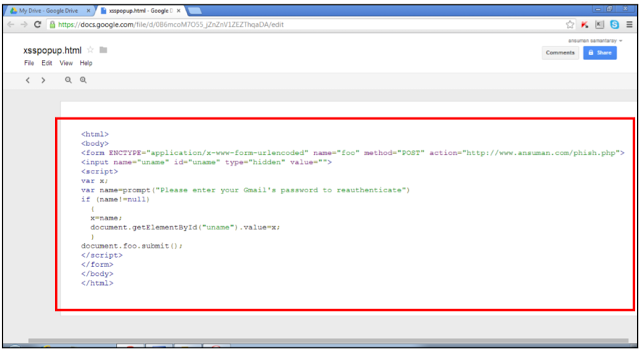
    An attacker could exploit the mode Google Drive preview the documents in the browser, he may execute code contained is a doc files as HTML/JavaScript just by changing the value of a parameter called “export” in the URL.

    Analyzing in detail the URL used to upload or create a file on Google Drive/Docs is possible to note the value “download” for the attribute “export” that alow user to download the document.
    https://docs.google.com/uc?authuser=0&id=0B6mcoM7O55_jWXp2N2FvdHBVTTg&export=download

    The Indian pentester  demonstrated that if an attacker changes “export” parameter to “view“, the malicious code written in the document file created is executed by the browser.
    https://docs.google.com/uc?authuser=0&id=0B6mcoM7O55_jWXp2N2FvdHBVTTg&export=view
    GoogleDocFlawTest

    The researcher at THN also provided proof of flaw, they uploaded a file on Google Drive and using the attribute value download.
    https://docs.google.com/uc?authuser=0&id=0B6mcoM7O55_jZnZnV1ZEZThqaDA&export=download
    meanwhile following there is the same link using view value for the export attribute.
    https://docs.google.com/uc?authuser=0&id=0B6mcoM7O55_jZnZnV1ZEZThqaDA&export=view
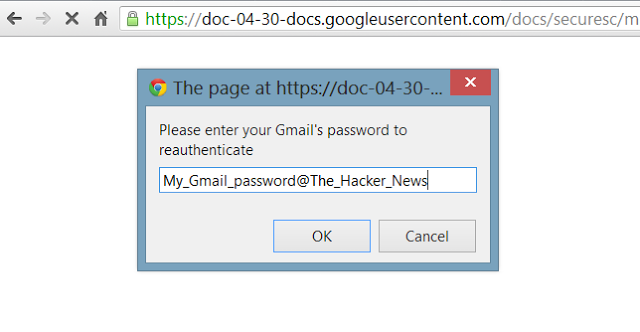
    The document contains a JavaScript code that displays a fake authentication box that request to the user to insert the password to re-authenticate him to the view of the document.
    FakeAuthBox
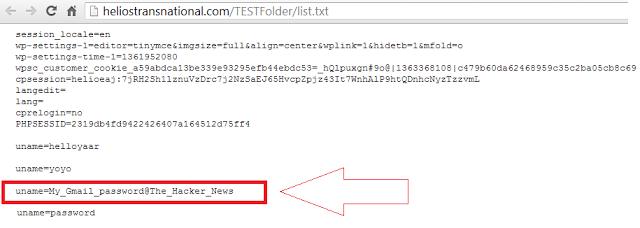
    Once submitted the password the scripts intercept it in a log file and redirect the user to Google Drive homepage.

    PWDList
    The hacker news Team revealed that Google Security Team in not new to similar error of evaluation of possible, last week another Google Drive Clickjacking Flaw was refused by Google, that later extends to phishing attack.