• Apple's macOS High Sierra, the newest version of its Mac and MacBook operating system, is available now. The operating system software, which launched to the public on 25 September 2017, brings new core technologies, including an entirely new file system, opportunities for developers looking to jump on the VR bandwagon, and refinements to apps such as Safari, Photos and Mail.
    In this article, you will learn everything you need to know about High Sierra: interface changes, new features and which Macs are compatible with the macOS High Sierra.
    We also have the details about the latest updates to High Sierra, the beta versions, and the new features Apple is adding to the operating system that all users will eventually see in the next update to High Sierra.
    Below we will run through the various version of High Sierra that are available, and the beta and public beta versions that have been issued so far.
    High Sierra's most recent update came on 29 November when Apple issued an update following the discovery of a macOS High Sierra root bug.
    Apple said that it was working on a software update to address this issue and the fix came 24 hours after the developer revealed the bug.
    Apple apologized saying that: "Security is a top priority for every Apple product and regrettably we stumbled with this release of macOS".


    macOS High Sierra 10.13.3 beta 

    Apple is currently developing 10.13.3 and beta testers have discovered it addresses an issue where an incorrect password could be used to unlock App Store preferences. 
    The vulnerability exists in macOS High Sierra version 10.13.2, allows someone with an administrator-level account to gain access to App Store settings in System Preferences. It won't work if you aren’t already logged in as an administrator though. 
    The issue was flagged by Open Radar. MacRumors says it was unable to reproduce the issue on macOS Sierra, so it seems that the flaw is limited to High Sierra.
    The vulnerability could allow someone to enable App Store settings that would automatically install app updates. 

    macOS 10.13.2 Supplemental Update

    To protect against ‘Spectre’ Apple issued a Supplemental Update to macOS 10.13.2 which includes a Spectre fix for Safari and WebKit.
    Installing mac OS 10.13.2 Supplemental Update will update Safari to version 11.0.2 (13604.4.7.1.6) or version 11.0.2 (13604.4.7.10.6). If the update isn't installed on your Mac automatically, visit the App Store and click on Updates.
    In early January 2018 Apple confirmed that Macs, iPhones and iPads were affected by flaws in Intel chips known as Meltdown and Spectre.
    Apple confirmed that Meltdown had already been addressed in macOS 10.13.2 and this is discussed in the next section.

    macOS High Sierra 10.13.2

    On Tuesday 28 November 2017, a new beta version of High Sierra became available for developers and public beta testers to download. This version was then issued to all High Sierra users on 6 December 2017.
    Apple says that this update improves the stability, compatibility and security of your Mac, and is recommended for all users.
    According to the company, the update
    ·        Improves compatibility with certain third-party USB audio devices
    ·        Improves VoiceOver navigation when viewing PDF documents in Preview
    ·        Improves compatibility of Braille displays with Mail
    In January 2018, Apple confirmed that macOS 10.13.2 also protects users from the Meltdown bug associated with flaws in Intel chips. The company issued a statement saying: "Apple released mitigations for Meltdown in iOS 11.2, macOS 10.13.2, and tvOS 11.2. watchOS did not require mitigation.
    Following the revelations about Intel's chips being affected by the Meltdown and Spectre flaws, Microsoft confirmed that its own update that protects PCs from the vulnerabilities could slow older PCs down. Luckily it doesn't appear that macOS 10.13.2 has a detrimental effect on Macs. We ran Geekbench and Cinebench before and after installing the update on a 2013 iMac and saw slightly lower Geekbench - 11213 before, 11142 after, while Cinebench seemed to be better scoring 67.98fbs & 410cb CPU before, and 69.89 fps, 456 cb CPU after. We don't think there is any reason to be concerned about these slight differences in test results.
    High Sierra 10.13.2 came in conjunction with Security Update 2017-002 for Sierra and Security Update 2017-005 for El Capitan. This Security Update addresses 22 security issues across the three versions of the operating system.
    According to Intego: "Apache, Directory Utility, Intel Graphics Driver and Kernel all received some attention. Mail received a fix for an issue that could cause S/MIME encrypted emails to be sent out unencrypted. Directory Utility and Screen Sharing Server had some work done to it to fix what was left of the root vulnerability. The Kernel received the most attention with 8 issues addressed that could lead to an application reading restricted memory contents and execute arbitrary code with kernel privileges."

    All in all, November was rather a bad month for Apple security-wise, with the root access bug gaining a lot of media attention. There have even been suggestions that High Sierra is Apple's worst release yet in terms of bugs and missing functionality (on the basis that Apple has been forced to make quick updates due to issues with the software).
    You can download macOS High Sierra 10.12.2 here, or visit the App Store on your Mac and choose Updates.

    Security Update 2017-001

    Apple issued Security Update 2017-001 for macOS High Sierra 10.13 and macOS High Sierra 10.13.1 on 29 November.
    The security update addressed the root bug issue where an attacker could bypass administrator authentication without supplying the administrator’s password, according to Apple's accompanying notes. 
    The flaw in macOS High Sierra (discovered on Tuesday 28 November 2017) allowed root access to a Mac without the need for a password. A malicious user could access your Security & Privacy settings in System Preferences, enter root as User Name, and, without any need for a password, gain all the administrator rights. Allowing them to change the user password, change your settings for downloading applications, and more.
    Apple notes that if you recently updated from macOS High Sierra 10.13 to 10.13.1, you should reboot your Mac to make sure the Security Update is applied properly.
    Apple offers this guide for those who wish to confirm that their Mac has Security Update 2017-001:
    1.     Open the Terminal app, which is in the Utilities folder of your Applications folder.
    2.     Type what /usr/libexec/opendirectoryd and press Return.
    3.     If Security Update 2017-001 was installed successfully, you will see one of these project version numbers:
    ·       opendirectoryd-483.1.5 on macOS High Sierra 10.13
    ·       opendirectoryd-483.20.7 on macOS High Sierra 10.13.1

    macOS High Sierra 10.13.1

    The newest update to High Sierra (High Sierra 10.13.1) was issued on 31 October 2017 and brings performance improvements, security enhancements and bug fixes, along with new emoji.


    That update became available to those on Apple's developer beta program Monday 23 October and the Public Beta program a day later. 


    ·       The update fixes a vulnerability in the WPA2 Wi-Fi standard that could allow attackers to exploit weaknesses in the WPA2 protocol to decrypt network traffic.


    ·       It also includes new emoji including t-rex, vampire, brain, zebra, giraffe hedgehog, a gender-neutral face and more. (The inclusion of Halloween related emoji was a good indication that the update would arrive by 31 October).


    macOS High Sierra 'Supplemental Update'

    Apple issued a 'Supplemental Update' on 5 October. The update fixes the following:
    ·       A vulnerability that could expose the passwords of encrypted Apple File System volumes.
    ·       A vulnerability that could allow a hacker to steal usernames and passwords of accounts stored in Keychain using a third-party app.
    ·       A cursor bug in Adobe InDesign.
    ·       An issue where Yahoo messages couldn't be deleted in Mail.

    High Sierra problems & fixes

    With every new version of the Mac operating system there tend to be a few issues, despite the fact that Apple runs an intense beta testing program. Below you will see any details we have of problems with High Sierra, and where available the fix for them

    macOS High Sierra root bug

    Your Mac can be hacked into thanks to a MacOS High Sierra root access flaw that allows administrative access to your Mac without a password.
    All the malicious user needs to do is enter root as a User Name, allowing them to change settings in System Preferences.
    You would have to have already logged onto your Mac and left it unattended for the flaw to be implemented.
    Apple issued Security Update 2017-001 at the end of November, and then macOS 10.13.2 on 5 December, to address the security issue, so if you haven't yet updated you should do so now via the  App Store on your Mac.

    Fusion Drives and APFS

    If you have a Fusion Drive you might want to hold of updating to High Sierra, although it should work fine, it just won’t be able to take advantage of one of the new features in High Sierra, the new Apple File System (APFS). 
    APFS is limited to Macs with Flash storage (or SSDs). Excluding Fusion Drives, which combine Flash with a Hard Drive, and older Hard Drive equipped models.
    Apple’s head of software engineering Craig Federighi has confirmed that APFS will be coming to those models soon, however.
    Federighi emailed a member of the public with the news, according to a Macrumors report, saying: "Yes, we plan to add support in a future update."
    The press release accompanying the High Sierra release also stated that Apple plans to introduce APFS support for Fusion Drives, and standard hard drives, in the future.
    The support for APFS on Fusion Drives was pulled from the beta in June, Macrumours speculates that this was likely to be due to stability problems and bugs.
    Because APFS was included in the early beta, anyone who was running the beta on a Fusion Drive equipped Mac may have issues if they try to update to the final version of High Sierra.
    This shouldn't affect anyone who hasn't been running the beta version of High Sierra, but if you have been running High Sierra beta on your Fusion Drive equipped iMac then beware that you will need to follow Apple's advice to convert your Fusion Drive back to the previous HFS+ format before installing High Sierra. 
    Apple's instructions, which you can read here suggest that you should first make a Time Machine back up, then create a bootable installer of High Sierra, and reformat the drive before recovering your data from the Time Machine backup.
    Apple also outlines how to overcome this particular challenge using Internet Recovery, but advises that it is only for advanced users.

    Security issues in High Sierra

    A security researcher has already claimed that he has discovered a way to extract passwords from the keychain in High Sierra.
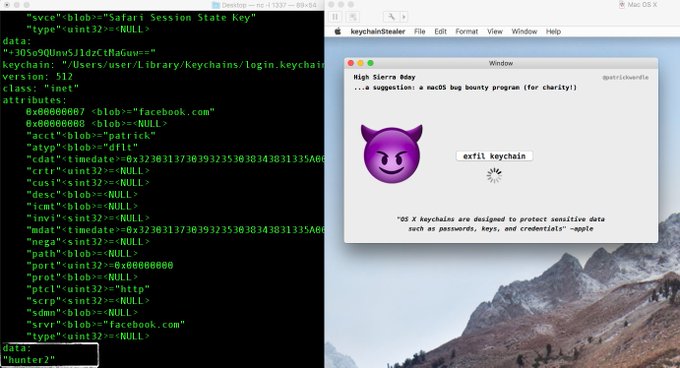
    Synack head of research Patrick Wardle has demonstrated code that is said to extract passwords from the Keychain without requiring a master password.
    However, while concerning, this security vulnerability isn't limited to High Sierra. It is also present in older versions of the MacOS - and Apple has reassured users that: "MacOS is designed to be secure by default, and Gatekeeper warns users against installing unsigned apps, like the one shown in this proof of concept, and prevents them from launching the app without explicit approval. We encourage users to download software only from trusted sources like the Mac App Store, and to pay careful attention to security dialogs that macOS presents," according to Gizmodo.
    While it hasn't confirmed this, it seems likely that the Supplemental Update issued by Apple on 5 October addresses this vulnerability.

    Compatibility with Apps

    There may also be issues with apps you use not working properly in macOS High Sierra. To find out if you are likely to encounter issues read: Which Apps won't work in High Sierra?

    New features in macOS High Sierra

    Sierra brought some big new features to the Mac, such as Siri and Apple Pay - so what's new in High Sierra?
    MacOS High Sierra brings changes with it that you might be unaware of because they are all happening 'under the hood'.
    These changes to the core technologies include:
    ·       A new Apple File System that will change the way the Mac stores your data, as well as make copying files faster.
    ·       Improvements that will enhance 4K video playback (and reduce the space taken up by those videos).
    ·       The graphics capabilities will be improved, bringing VR to supported Macs.
    High Sierra reminds us of Mac OS X Mountain Lion and Mac OS X Snow Leopard - two updates that built on the OS changes introduced in the previous year's versions (Lion and Leopard respectively), and focused more on the underlying technologies, with fewer changes to the outside. Keeping Sierra as part of the name certainly seems to back this up.
    However, there are ways in which these core technologies will improve your Mac experience in a way you will notice. Speaking on 1 August, Tim Cook talked briefly about the "immersive gaming, 3D and virtual reality experiences made possible with the upcoming release of macOS High Sierra".
    There are also some new features coming to some of the apps Apple ships with macOS, such as the ability to turn off autoplaying video in Safari, and new advanced editing tools in Photos.
    You can also expect to see updates to:
    ·       Mail
    ·       Siri
    ·       iCloud
    ·       Spotlight
    ·       Notes
    ·       Messages
    We'll discuss the changes coming to all of those apps below, addressing the 'core technologies' later on in this article.

    Safari

    Note Safari 11 is available for earlier versions of the macOS too.
    New features in Safari 11 will help you personalise your experience when surfing the web. You can refine your settings for particular websites - making the text bigger for example on one site, or adjusting your location settings for another.
    Apple is determined to make surfing the web a more pleasant experience, much to the dismay of advertisers as a result there will be no more auto-playing videos and no more cookies tracking your surfing habits and aiding advertisers who want to target ads to your interests.
    Apple sells this as Intelligent Tracking Prevention which identifies trackers and keeps your browsing history between you and your internet provider rather than third parties.
    What this means to users is that in macOS High Sierra, Safari automatically blocks audio and video on every site visited unless you specifically tell Safari that you want to hear the audio/video playback. Once you’ve ‘told’ Safari that a certain website can play audio and video, it should remember that the next time you visit the site (because who wants to enable it for every YouTube video they watch?).


    As a final nail in the advertiser's coffin, Apple will make all pages that support Safari Reader appear thus in your browser - with ads stripped out. For more information read How to use the new features in High Sierra

    Photos

    The Photos app for Mac is gaining some new organization tools including an always-on side bar (like we had in iPhoto). This new side bar will make it easier to find things, or at least that's Apple's aim.

    There will be a redesigned Edit view along with new editing tools including Curves for fine-tuning and Selective Color for making adjustments within a defined colour range. You'll also find new professionally inspired filters.


    Speaking of editing, Live Photos will gain a new Loop effect, so you can create a looping video, as well as a Bounce effect, which will play the action forward and backward.
    There's also a Long Exposure effect coming which will use Live Photos to blur water or extend light trails for a slow-shutterspeed-like effect. You'll also be able to capture Live Photos from within FaceTime.

    Your People Album will get larger thumbnails and more accurate grouping of the 'Faces' (and this will stay in sync across all your devices if you use iCloud Photo Library.
    Apple's also introducing lots of new Memories categories - including pets, babies, outdoor activities, performances, weddings, birthdays and sporting events, and you'll be able to easily filter photo collections by your favourite criteria.
    Other handy changes in Photos include:
    ·       Viewing past imports in chronological order
    ·       The ability to do various functions right from the toolbar, such as rotate and favourite batches of images
    ·       The selection counter will tell you how many things you have selected
    ·       Filtering photo collections according to criteria
    ·       Photos will support external editors, e.g. Photoshop can launch within Photos and save edits to the Photos library
    ·       Third-party projects extensions that let you order framed prints, create web pages and more

    Mail

    Apple has also tinkered with the Mail app for MacOS High Sierra.
    Updates will include improvements to search to make it easier to find what you are looking for amid our ever-growing inboxes.
    Top Hits adds a section at the top of your search results that includes the messages deemed to be most relevant to your search. These Top Hits are based on the mail you've read, the senders you reply to most often and people you have designated VIP status. According to Apple, the more you search, the smarter it gets.


    Mail will also offer a long-requested feature; split-screen view when running the app full-screen.
    Essentially, if you’ve got the Mail app open full-screen in macOS High Sierra and you want to send a new email, the composition window will open on the right-hand side of the screen instead of a new window, as currently it does in macOS Sierra.

    Siri

    Apple remains the only major AI player to offer the choice between a male and female voice, and these voices are going to get even more natural in macOS High Sierra.
    Siri's voice will be much more expressive and less robotic. You can expect more changes in expression and intonation.
    Siri is more than just a pretty voice, though. It will be taking on the role of DJ, learning your preferences based on what you listen to (if you're an Apple Music subscriber) and making recommendations, as well as helpfully putting together playlists for you.


    Spotlight

    The main addition to Spotlight appears to be integration with flight information. You'll be able to enter your flight number to see arrival and departure times, terminals, gates, delays, and more.
    Spotlight results will also include multiple Wikipedia pages when there is more than one answer to your query.

    Notes

    We think this one is a great addition - you'll be able to Pin your most frequently used notes to the top so you can easily find them. This sure beat having to re-save a Note every time we access it so that it doesn't get buried.

    Messages

    This is perhaps one of the most exciting elements of the new Mac and iOS operating systems.
    Your Messages are going to be stored in iCloud, so if you ever lose your phone you won't lose all your messages, and more importantly, your Messages will be in sync across all your devices, so you won't see alerts on your Mac for messages you have already read on your iPhone.
    Because Messages will be stored in the cloud they won't take up space on your Mac or iPhone either.

    Apple File System

    Now we've covered the fun stuff (i.e. the apps we use every day). Onto the under the hood changes that will hopefully enhance our overall experience on our Macs come this autumn.
    First up is the introduction of the Apple File System (APFS) on the Mac. APFS arrived on our iPhones earlier this year in an update to iOS 10, and when it arrived the first thing we all noticed was that we got gigabytes of space back following the update. This is because Apple has rearchitected the way it stores data on its devices.
    But APFS will do more than reduce the amount of space our data takes up. It will also make duplicating a file and finding the size of a folder instantaneous.

    It also keeps files safe with built-in encryption, helps protect data from power outages and system crashes, and offers simplified data backup, according to Apple.
    And perhaps most importantly, it is compatible with HFS drives and data, so you shouldn't lose any data (although we'd always recommend that you back up!), and is designed with future advancements in storage technology in mind.
    Why is this so exciting for Mac users? In addition to offering increased security when compared to the standard HPF system and built-in drive encryption, it offers a dramatic speed bump in file transfer speeds – ideal for those that move/copy/duplicate large files.
    The introduction of APFS may even free up a bit of storage like it did for iOS users when Apple introduced it in iOS 10.3!

    Video

    High Sierra will also see Apple move to the H.265 video standard to support better 4K playback. H.265, also known as HEVC (High Efficiency Video Coding) compresses video 40% more than H.264, and means high-def videos will take up less space on your Mac. High-quality video streaming will be possible too.
    It's not just about watching videos, though. The hardware accelerations on the new iMac and MacBook Pros will make HEVC encoding and editing possible.
    (H.265 will also be arriving in iOS 11 for iPhone 7 and 7 Plus, and the next iPhone.)

    Metal 2

    The Metal technology built into macOS makes it possible for apps to use the full power of the graphics processors. The incoming Metal 2 update brings new capabilities in machine learning, virtual reality and external GPU support.
    The API has also been refined, and Apple claims it offers improved performance.
    In conjunction with Thunderbolt 3, Apple will offer external GPU support on supported Macs (although this is expected to be a later addition, coming in Spring 2018).
    Apple is offering an External Graphics Developer Kit to developers of apps that use Metal, OpenCL, and OpenGL. It costs £749 and will furnish them with all the hardware and software they need to optimise their app, it includes:
    ·       Sonnet external GPU chassis with Thunderbolt 3 and 350W power supply
    ·       AMD Radeon RX 580 8GB graphics card
    ·       Belkin USB-C to 4-port USB-A hub
    ·       Promo code for $100 towards the purchase of HTC Vive VR headset

    Virtual Reality

    Apple will be offering support for VR content creation for the first time in High Sierra and as a result developers will be able to create immersive gaming, 3D and VR content on the Mac.
    These capabilities are limited to the new 2017 iMac with Retina 5K display, the new iMac Pro coming in late 2017 and any supported Mac paired with an external GPU (although the latter will be delayed until Spring 2018).
    Developers will be able to use peripherals like the HTC Vive VR headset and apps like Final Cut Pro X, SteamVR, Epic Unreal 4 Editor and Unity Editor to create immersive new worlds, says Apple.
    Regarding its own video suite - Apple says that Final Cut Pro X will add support for professional 360-degree workflows with the ability to import, edit and export 360-degree video, "later this year".
    Already, Steam is optimizing their SteamVR platform for macOS and enabling connection of the HTC Vive headset, according to Apple.
    This is in part thanks to the new Metal 2 technology introduced as part of the update that’ll give the existing Mac range a hefty boost in terms of graphical power, and signifies a huge step in the VR world; only months ago, Oculus claimed its Mac support was on hold due to the power required to use the headset.
    Will this change now? Only time will tell, but we imagine it will be the case. 


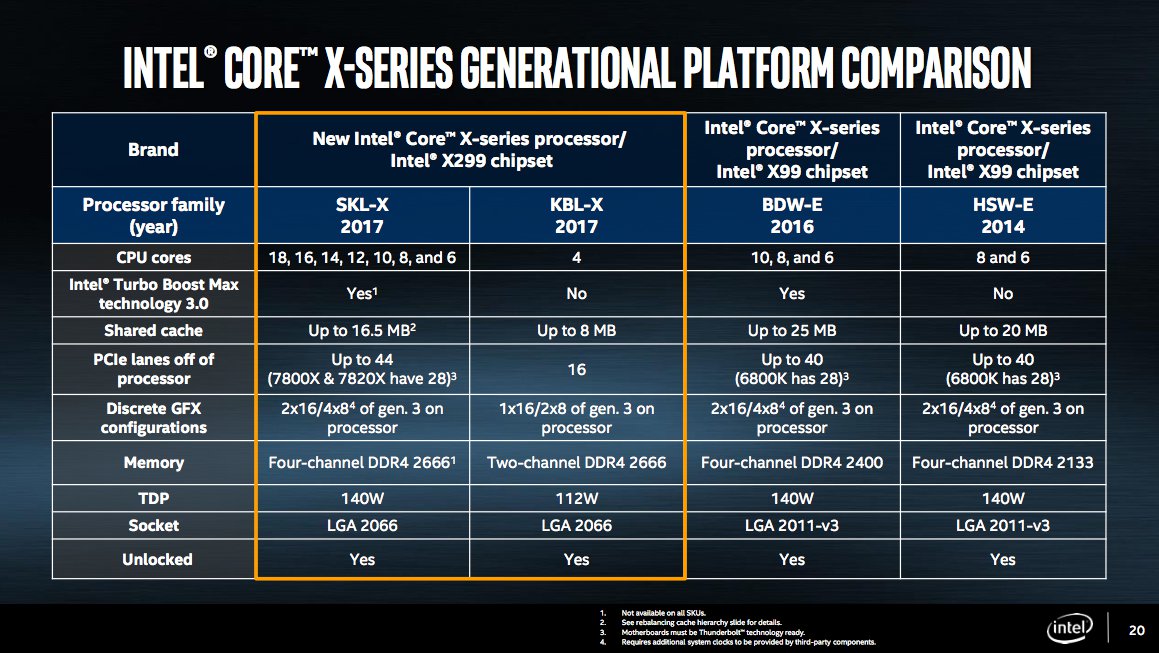
  • Skylake is the codename for Intel's sixth-generation range of Core laptop and desktop PC processors. They've already been superseded by the seventh-gen CPUs and you can find out how Skylake compares with Kaby Lake.

    But Skylake isn't dead yet. No. Intel has launched Skylake X CPUs, which are the high-end enthusiast versions.

    Interestingly, Intel isn't using the Core i7 branding as it has done in previous years but add a new number: 9. The Core i9 range could be in response to AMD's Ryzen processors, which were named to seem similar to Intel's Core i5 and i7 ranges. 

    Last year at Computex, Intel unveiled its first 10-core consumer CPU, the company's move into the world of a "megatasking." It was a pricey chip, launching at around $1,700, but it satisfied the needs for users who needed to juggle several intensive tasks at once. Now, Intel has upped the ante with a whole new family of processors for enthusiasts, the Core X-series, and it's spearheaded by its first 18-core CPU, the i9-7980XE.

    Priced at $1,999, the 7980XE is clearly not a chip you'd see in an average desktop. Instead, it's more of a statement from Intel. It beats out AMD's 16-core Threadripper CPU, which was slated to be that company's most powerful consumer processor for 2017. And it gives Intel yet another way to satisfy the demands of power-hungry users who might want to do things like play games in 4K while broadcasting them in HD over Twitch. And as if its massive core count wasn't enough, the i9-7980XE is also the first Intel consumer chip that packs in over a teraflop worth of computing power.


    If 18 cores is a bit too rich for you, Intel also has other Core i9 Extreme Edition chips in 10, 12, 14 and 16-core variants. Perhaps the best news for hardware geeks: the 10 core i9-7900X will retail for $999, a significant discount from last year's version.

    All of the i9 chips feature base clock speeds of 3.3GHz, reaching up to 4.3GHz dual-core speeds with Turbo Boost 2.0 and 4.5GHz with Turbo Boost 3.0. And speaking of Turbo Boost 3.0, its performance has also been improved in the new Extreme Edition chips to increase both single and dual-core speeds. Rounding out the X-Series family are the quad-core i5-7640X and i7 models in 4, 6 and 8-core models.


    While it might all seem like overkill, Intel says its Core i9 lineup was driven by the surprising demand for last year's 10-core chip. "Broadwell-E was kind of an experiment," an Intel rep said. "It sold... Proving that our enthusiast community will go after the best of the best... Yes we're adding higher core count, but we're also introducing lower core counts. Scalability on both ends are what we went after."

    As you can imagine, stuffing more cores into a processor leads to some significant heat issues. For that reason, Intel developed its own liquid cooling solution, which will work across these new chips, as well as some previous generations. All of the new Core i9 processors, along with the 6 and 8-core i7 chips, feature scorching hot 140W thermal design points (TDPs), the maximum amount of power that they'll draw. That's the same as last year's 10-core CPU, but it's still well above the 91W TDP from Intel's more affordable i7-7700K.

    Over the past few years, Intel's laptop chips have been far more interesting than its desktop CPUs. Partially, that's because the rise of ultraportables and convertible laptops have shifted its focus away from delivering as much computing power as possible, to offering a reasonable amount of processing power efficiently. The new Core i9 X-series processors might not be feasible for most consumers, but for the hardware geeks who treat their rigs like hot rods, they're a dream come true.


    When is the Core i9 release date?


    Release date: June 2017*

    At the chips' launch at Computex 2017, Intel said the new processors would be on sale "in the coming weeks". *That applies to the Core i9-7900X downwards. 

    The i9-7920X will go on sale in August, while the top three chips don't yet have an official release date.


  • There is a lot more our industry should be doing to protect its systems and data from cyber blackmail.

    The scope and severity of the fallout from the WannaCry attacks over the past week elicits plenty of "we told you so" head shakes about the dangers of ransomware. With a lightning-fast speed, the blackmail worm spread quickly.

    According to Europol, the attack had reached about 150 countries and more than 200,000 systems. When security researchers found a kill-switch for the attack that they used to their advantage, it didn't take long for new variants to start up again with infections occurring at a rate of 3,600 systems per hour.

    It was a nasty bit of business and while the hue and cry over ransomware shouldn’t be ignored, there are a lot more valuable lessons beyond those that have to do with cyber blackmail. Here are just a few of them.

    1: Vulnerability and Patch Management overshadows everything

    Patch, patch and patch. It's been the overwhelming mantra of security pros for decades, and this attack campaign shows us why. The rapid spread of the worm was made possible by the ubiquity of systems worldwide running on unsupported or unpatched operating systems.
    Hopefully, after this attack, organizations will significantly alter their continuous patch hygiene. Microsoft also released new emergency patches for Windows XP and 2003, even though it has stopped all security updates and technical support for XP since April 2014, which simply shows the seriousness of the attack and the risk of deploying out-of-date operating systems in work environments."

    2: Unknown Assets can cause you so much problems

    It's just about impossible to patch systems an organization doesn't even know exists. The insidious effects of WannaCry offer up a good illustration of how easy it is for attackers to scale attacks against the forgotten systems that can be lost through inconsistent asset management.
    "Attackers performing reconnaissance will often find unknown, unprotected, and unmonitored assets to use as attack vectors," says Steve Ginty, senior product manager at RiskIQ. "For a large enterprise, these types of assets are typically easy for even novice hackers and threat groups to find, and because they’re unmonitored, they provide an easy way in and out. To defend yourself, you need to know what attackers see when they’re looking at your business from outside the firewall."

    3: Network Segmentation Can Be a Valuable Risk Reducer

    Of course, patch management isn't as simple as just finding every system and waving a magic wand over them. Many organizations struggle to update legacy and embedded systems due to a host of technical problems. It's why WannaCry found such fertile ground in healthcare organizations, since many medical devices are built on top of old Windows operating systems that are very difficult to update due to government regulations and the organizations' own concerns about causing system disruptions during updates. We all have faced challenge(s) while updating our work and personal devices at one point or the other.
    "In many cases, devices will never receive updates either because the OS is no longer supported and memory, storage, and processing constraints may prevent the device from operating effectively with the latest software. Finally, I suspect that many hospital administrators may not recognize the danger from using outdated software on these devices, and simply avoid patching because the device works. Thus 'if it ain’t broke, don’t try to fix it' mentality can be tremendously detrimental to hospital security."
    This scenario is a perfect example of how compensating controls - like network segmentation - should have kicked in for a lot of organizations.
    "Of course, today, completely disconnecting a machine from the Internet typically renders it of little use. But network connectivity can be limited as much as possible," says Brighten Godfrey, co-founder and CTO of Veriflow. "Segmentation requires careful network architecture, especially in a complex environment where configurations of firewalls, routers and other devices are continually changing. Rigorous network verification methods can help ensure that the intended segmentation is continually realized."

    4: Security Has Real-World Repercussions

    Speaking of healthcare, one of the big-picture lessons that security professionals around the world should be thinking deeply about is the fact that cybersecurity is no longer just a game of protecting data. When attacks happen today, they have real-world repercussions that can affect the safety of people's life and limb.
    "With so many medical devices connected to the internet, it’s not surprising to know that some of these devices were rendered useless by WannaCry," says Terry Ray, chief product strategist for Imperva.
    The attacks against the UK's National Health Service put hospital operations at a standstill and threatened the health of real people. As much as the security industry talks about its struggle with attackers as a game, using terminology like "whack-a-mole" and "cat-and-mouse" to describe the back-and-forth exchanges, the truth that WannaCry should bring home is that what we're engaged in is not frivolous or fun. The consequences are real and serious.

    5: It's Easy to Forget the 'A' in Security's 'CIA'

    So many security organizations get hung up on the confidentiality and integrity part of IT risk management that they forget the final leg of that three-legged stool: availability. According to estimates from Cyence researchers, the business interruption costs to companies from WannaCry will add up to over $8 billion.
    "Business interruption caused by the WannaCry malware is probably the most substantial and problematic component to this event. Organizations will suffer interruptions to their business, lost income, and extra expenses while the infection is being remediated – and it will take some time to get back to full productivity even after systems are restored.
    Obviously, these are big-picture lessons. And it will take time to turn these lessons into meaningful action. In the meantime, for those who've found they've lost access to their WindowsXP systems, there's at least some good news on that front. Security researchers with the French security firm Quarkslab have released a tool called Wannakey, which can help recover the private encryption key for infected WindowsXP systems.


  • Hackers can steal macOS keychain passwords using unsigned applications, it works on the latest version of macOS, High Sierra 10.13, and previous releases.


    Cyber security expert Patrick Wardle, director of research at Synack, revealed that unsigned applications can steal macOS Keychain passwords, including plaintext passwords from the latest version of macOS High Sierra and previous versions of macOS.

    The researchers tested the exploit on Sierra and High Sierra, but he confirmed that El Capitan appears vulnerable as well. This issue is not a ‘High Sierra specific’ vulnerability.
    The researchers shared a video that shows how an unsigned application can exfiltrate sensitive data from the macOS Keychain, including plaintext passwords.

    OS keychain hack

    “What does your attack do?


    A: I discovered a flaw where malicious non-privileged code (or apps) could programmatically access the keychain and dump all this data …. including your plain text passwords. This is not something that is supposed to happen! :(” explained Wardle.


    on High Sierra (unsigned) apps can programmatically dump & exfil keychain (w/ your plaintext passwords)🍎🙈😭
    https://

    It interesting to note that the attack does not require root permissions. The attack does require the knowledge of the master password, it only needs the targeted user to download and launched a malicious application, clearly ignoring the warnings displayed when an app from an unidentified developer is being executed.

    “Q: What are the prerequisites for this attack?


    A: As this is a local attack, this means a hacker or piece of malware must first infect your your Mac! Typical ways to accomplish this include emails (with malicious attachments),  fake web popups (“your Flash player needs updating”), or sometimes legitimate application websites are hacked (e.g. Transmission, Handbrake, etc). Theoretically, this attack would be added as a capability or as a payload of such malware. For example, the malware would persist, survey the system, then use this attack to dump the keychain. If I was writing a modular mac backdoor or implant, I’d call it the “dump keychain” plugin :)”  added the expert.


    Wardle reported the discovery to Apple along with a proof-of-concept (PoC) code, he avoided to publicly disclose technical details to prevent malicious actors from abusing the technique.
    Security experts always recommend customers to download applications only from trusted sources and pay attention to the security warnings displayed by the operating system.

    “A few things. As mentioned before, this attack is local, meaning malicious adversaries have to  first compromise your mac in some way. So best bet – don’t get infected. This means run the latest version of macOS and don’t run random apps from emails or the web. Also, this attack requires that the keychain is unlocked. By default the keychain is unlocked when the user logs in. However, you can change the keychain password (so it is not automatically unlocked during login, or (via the Keychain Access app) lock the keychain while you are not using it. ” suggests Wardle to stay safe.

    Unfortunately, Apple’s bug bounty program doesn’t cover macOS., this means that the expert will not be rewarded. Well, let's hope that Apple will make his case an exception.
  • Security Experts at Sophos explained the efficiency of the business model known as Cybercrime-as-a-Service in the specific case of Vawtrak botnet.

    The term Cybercrime-as-a-Service refers the practice in the cyber criminal ecosystem to provide product and services for use by other criminals. In September 2014, a report from Europol’s European Cybercrime Centre (EC3), the 2014 Internet Organised Crime Threat Assessment (iOCTA) report, revealed the diffusion of the business model in the underground communities and highlighted that barriers to entry in cybercrime ring are being lowered even if criminal gangs have no specific technical skills.

    Criminals can rent a botnet of machines for their illegal activities, instead to infect thousands of machines worldwide. These malicious infrastructures are built with a few requirements that make them suitable for the criminals, including User-friendly Command and Control infrastructure and sophisticated evasion techniques.
    The botnets are very flexible and could be used for several purposes, including to serve malware or to send out spam emails. For example, the botnet’s computers can be configured to serve as proxies or even — once all the other usability has been sucked out of them — as spambots.

    An example of banking malware botnet is Vawtrak, also known as NeverQuest and Snifula. According data provided by Sophos, Vawtrak was the second most popular malware distributed by malicious drive-by downloads in the period between September and November.

    Sophos published an interesting paper on the cybercrime-as-a-service model applied to the Vawtrak botnet, titled “Vawtrak – International Crimeware-as-a-Service“.
    “If you look at the client-side, the commands used, and the debugging code, suggests that it’s more user friendly than some of the other malware we look at,” said James Wyke, senior threat analyst at Sophos Ltd. “It’s almost certainly going to be a point-and-click Web-based interface. Simplicity is one of Vawtrak‘s positive points.”

    Despite Wyke hasn’t personally evaluated the Vawtrak for leal and ethical reasonsSophos was able to investigate the activities Vawtrak platform is being used for. The experts recognized a pattern in the “modus operandi” of the Vawtrak clients, which used the botnet to target banks and other financial institutions worldwide. The attackers are able to run sophisticated attacks in a methodical way, by-passing two-factor authentication mechanisms and implementing custom injection mechanism.

    The experts revealed that Vawtrak was used by criminal organization in US to compromise both large banks (i.e. Bank of America and Citigroup) and smaller financial institutions (i.e. Bank of Oklahoma, Cincinnati’s Fifth Third Bank, the Columbus-based Huntington National Bank).

    There are tens of thousands of computers already infected and in the network, Wyke said.
    cybercrime-as-a-service botnet infections

    That makes it smaller than some of its competitors but, because of its business model, it might actually be more profitable.
    The cybercrime-as-a-service model developed for the Vawtrak botnet allows customers to choose specific types of infected machines, to customize the botnet to hit a specific target (i.e. banks, private firms) or to request specific types of stolen data.
    “If you want banking credentials for certain banks, or certain regions of the world, they can start campaigns targeting those banks or those countries,” said Wyke. “We’re moving away from the model where the cybercriminals write their own software, or sell you a kit and you go away and create your own botnet,” Wyke said.

    The availability of stolen data makes the model of sale Cybercrime-as-a-Service very attractive for criminals that can use them to run further attacks by having more information on the targets.

    The Vawtrak botnet provides also specific data hijacked by the botnet, including banking access credentials, that allows the criminals to deliver new strain of malware to the infected computers.
    “This is a flexible business model,” he said. “Once the machine starts sending out spam it becomes obvious that it’s infected with malware and it’s not going to be infected much longer,” he said.

    Experts at Sophos suggest to keep defense systems up-to-date and provide a free removal tool for the Vawtrak botnet on the company website.

  • A basic guide to the Internet's underbelly -- the Dark Web.


    Deep or Dark?

    There's a difference between the "Deep Web" and "Dark Web." While the "Clear Web" is the surface area which is indexed by search engines such as Google and Yahoo, the Deep Web is an area search engines can't crawl for or index. Plunging in further, the Dark Web is a small area within the Deep Web which is intentionally hidden from discovery.


    How do you access the Dark Web?

    You can't use standard access methods to gain entry into the Dark Web. The most common method is through the Tor network, an anonymous network created from nodes which disguise online activity. In order to use Tor, you need the Tor browser, and may also need to be issued an invitation to access certain .onion domains hidden within the Dark Web.


    Wait, .onion domains?

    An .onion address is the result of Onion networking -- low-latency communication designed to resist traffic analysis and surveillance. The use of Onion networking is not a perfect solution to maintain anonymity, but it does help disguise who is communicating with whom.


    It's not just drugs

    Many of us heard when the underground marketplace Silk Road, one of the largest hidden within the Tor network, was taken down following an investigation by US authorities. However, there are many more vendors peddling their wares within the Dark Web. While drugs are the most commonly-thought of when it comes to the secretive area, you can also purchase a plethora of other illegal goods. Weapons, porn, counterfeit money and fake identities, hacked accounts and even hitmen can be found if you have the cash. If someone annoys you, sending over a SWAT team as a "prank" is also possible.


    It's also something of an eBay for peculiar items.

    A quick browse and I could buy lifetime membership passes to popular services such as Netflix, old consoles, clothing, emulators and DVDs, a car or two and bulk weight loss pills. Technology is also popular -- there is a wealth of devices available -- both counterfeit and apparently legitimate -- if you know where to look.


    The Dark Web is used for more than buying and selling.

    So-called "ethical" hacking and political forums, archives of forbidden books, tips on how to care for your cat -- there are potentially thousands of private .onion addresses hosted which go beyond marketplaces.


    Trading is hardly safe or risk-free

    Whether you take a risk with buying bargain designer clothes on the Clear Web or sink a few Bitcoins in purchasing illegal items through the Dark Web, neither is risk-free.
    Vendors and sellers might be trying to avoid the eyes of legal enforcement in the darker side of the Internet, but this doesn't stop scams from taking place. Scam vendors and quick grab-and-run schemes run rampant -- especially as there is no way to follow up with failed sales down the legal route.


    Buying and selling through the Dark Web

    How do you trade without being linked to bank accounts? Virtual currency is the most common method, which includes "tumbling," a laundering process which destroys the connection between a Bitcoin address which sends virtual currency and the recipient in the hopes of covering a user's tracks. Some vendors offer escrow services which holds Bitcoin in trust until goods have been delivered and both parties are happy -- although value fluctuations linked to Bitcoin use makes this move risky.


    Avoiding spying eyes

    Aside from using the Tor browser and VPNs, a number of buyers and sellers use "Tails," free software which can be booted from flash storage to provide end-to-end encryption for your browsing sessions.
    To further cover their tracks, vendors and sellers will often also use public Wi-Fi hotspots to conduct their business.


    Reddit is used as a communication platform for Dark Web transactions

    Although far from exhaustive, the best Clear Web resource to bounce around and learn a little about the darker, nastier aspects of the Internet is on Reddit. There are sub-forums in which Dark Web vendors and buyers exchange news, thoughts and seller reviews. Advice is also issued on how best to "clean house," create safe "drop" zones to pick up packages ordered from the Dark Web and what to do if you think law enforcement is keeping an eye on you.

    There is a whole lot more to know about the Deep web. Click this link to read more.