


-
Read This Before You Finalize It!
 As an IT professional, knowing what’s coming down the technology pipeline can be invaluable when it comes to planning and budgeting. Although nobody has a crystal ball, Gartner’s professional pulse on all things technological certainly makes the research company’s predictions worth noting.At a Gartner Symposium IT Expo in late 2012, the firm laid out 10 critical trends and technologies slated to impact IT for the next five years. Take note, as we explore the first five here:1. Organizational entrenchment and disruption. With significant growth in IT complexity — including faster change cycles, shorter development timelines, and reduced budgets 24/7/365, global IT support is being demanded. End users are driving IT to make changes, such as appealing for access to iPads, iPhones and other smart phones. Furthermore, a “skills shift” is occurring with increasing numbers of retirees and new sets of skills required of employees.2. Software-defined networks. In the coming years, Gartner believes a new way to operate networks will emerge-an OS that shifts control from individual devices to a central controller and allows configuration of the network from one place. Likened to network virtualization, the move will make the location of a physical data center irrelevant, while also reducing the time required to provision new resources.3. Bigger data and storage. By 2015, Gartner says big data demand will generate 1 million jobs in the Global 1000, but only a third will get filled due to shortage of talent. Also on thehorizon: 30 to 60 percent compounded growth in data depending on the organization. Auditing, archiving, and recovery will become increasingly complex, with analytics and pattern recognition proving key. New specialized ARM-based servers will be commissioned to do specialty analytics, and clients will get relief from equipment that provides more performance in a smaller footprint, thus reducing power requirements.4. Hybrid cloud services. Gartner believes that private clouds will improve agility and dominate the market. People are looking at the cloud as a way to accelerate business growth, particularly mobile apps, which could lead to hybrid environments with dozens of specialty providers, both private and public. “Hybrid data centers — with the ability to increase capability and/or capacity — will be in your future,” Gartner insists. You can move non-critical work to the cloud to free up space, resulting in incremental operating expense growth, but long-term capital spending deferral.5. Client and server architectures. One size doesn’t fit all, nor does one operating system. Noting that forced end-user standardization just doesn’t work, Gartner encourages companies to let people do what they want, within reason. For example, allowing tablets is a must, as well as wireless networks, instant messaging and smartphones. While the research firm says Windows 8 will surface within IT organization, it predicts that it will not be a full replacement for Windows 7 or XP.Already feeling better prepared for the next five years? Be sure to check back for additional IT trend predictions.
 -
Many organisations are struggling to keep pace with the changing face of security threats, according to a poll conducted by F5 Networks at Infosecurity Europe 2013 in London.Only 10% of security professionals polled said they could describe accurately how DNS reflection attacks work, just weeks after a spat between web hosting company Cyberbunker and anti-spam website Spamhaus led to some of the biggest distributed denial-of-service(DDoS) attacks to date.DNS reflection or amplification is a type of distributed denial of service (DDoS) attack that takes advantage of the fact that a small DNS query can generate a much larger response.When combined with source address spoofing, an attacker can direct a large volume of network traffic to a target system by initiating relatively small DNS queries.The poll found that only 11% would be completely confident that the day-to-day operations of their business would not be disrupted, should they be hit by such an attack.Many respondents reported feeling vulnerable due to the host of modern threats from cyber criminals, hacktivists and hackers.Some 87% claimed that it is more difficult than ever to secure their business from the threat of cyber attacks, with almost one in four citing the BYOD trend as the major factor.Others referenced the increasing complexity of threats (20%) and the change to espionage and political motives (14%) as the number one factor in increasing the difficulty in protecting businesses.The poll revealed other concerns around protecting infrastructure and applications, with 83% of respondents saying they were less than fully confident that their organisation has consistent security and availability policies across their entire IT infrastructure.“Both the scale and the method of the Spamhaus attacks should have acted as a wake-up call, but the research suggests that many security professionals would still struggle to deal effectively with the new breed of DDoS attacks, and fear the potential impact on their organisation,” said Joakim Sundberg, security solution architect at F5.Some 85% acknowledged the risk of wiping personal as well as company data when safeguarding a corporate mobile device following a theft.“As organisations continue to move their applications to the cloud as a way to increase infrastructure agility and reduce costs, it is vital that they close off any back doors to would-be attackers,” he said.According to Sundberg, conventional firewalls are failing in the face of increasingly complex internet threats.More intelligence has to be built into the corporate network to ensure their security can handle the newest threats, he said.“This includes being able to configure and automate security seamlessly to ensure the entire IT environment is protected, regardless of the mix of on-premise, cloud or hybrid infrastructures,”
-
We first heard rumors about a possible comeback of the Start menu button in Windows 8.1 last week, but now sources speaking to The Verge have confirmed that this will indeed be the case, only it’s probably not what most detractors were hoping for. The newly reintroduced button will reportedly sit on the traditional bottom left corner, and will look near-identical to the existing Windows flag used in the Charm bar, but clicking on it will simply bring up the tile-based Start screen rather than the old Start menu.There are already several quick ways to get back to the Start screen from the desktop. Users can just press the Windows key on their keyboard, or hover their mouse over the lower left corner of the screen until a Start screen thumbnail shows, and then click. So while there’s nothing new here functionality-wise, Microsoft apparently hopes to appease at least some of the criticism by adding a shortcut users might be more familiarized with.To be fair, you can already do everything the Start menu allowed with the redesigned Start screen -- searching, opening recent files, quickly launching apps, jumping to the control panel and so on. But those who have been criticizing the change have an issue with having to jump back and forth between Modern UI and the desktop to do these things.Another noteworthy change expected to arrive with the upcoming “Blue” update is the addition of a boot to desktop option. So far only hints of this have appeared on internal builds, and there’s currently no toggle to enable it through the operating system’s UI, but Microsoft is apparently working on how to add this feature -- News sources confirms this feature might be limited to Pro and Enterprise Windows 8 SKUs only. -
While the imminent arrival of next-gen USB andThunderbolt interfaces is no longer fresh news, ComputerWorld brings to attention one potentially revolutionary detail: the next iteration of USB will deliver enough juice to effectively power any device without the aid of unsightly wall-warts.To do this, USB 3.0's move from 5Gbps to 10Gbps will be accompanied by significant bump (pdf) in power delivery -- 100 watts instead of just 10 watts. With that kind of juice, everything from full-size external hard drives to displays -- and even laptops -- could all fall within the purview of USB's new-found bus power.That's an enormous improvement over today's limitations where small devices like external HDDs, cell phones and tablets can push power draw limits.One example shown at Intel's Developer Forum was of a Lenovo laptop, a LCD monitor and other peripherals all simultaneously being powered by a USB SuperSpeed hub.To help make certain things are safe and standardized, USB 3.0 is expected to have five different power profiles (pdf):- Profile 1: 5V @ 2.0A
- Profile 2: 5V @ 2.0A or 12v @1.5A
- Profile 3: 5V @ 2.0A, 12V @ 3A
- Profile 4: 5V @ 2.0A, 12V or 20V at 3A
- Profile 5 : 5V @ 2.0A, 12V or 20V at 5A
While convenience is an obvious benefit of increasing the power output for USB, there is one less conspicuous bonus: greener electronics. Billions of power adapters for portable electronics are chucked into the trash each year. USB's pending upgrade stands to reduce that number by a significant margin. -
Makers of Android malware have developed an ad network SDK that pushes malicious software through seemingly innocuous apps.Google has suspended several accounts associated with 32 apps on Google Play containing the malicious SDK which have been downloaded up to nine million times, according to mobile security firm Lookout.Legitimate ad network SDKs, such as Google's own AdMob SDK, offer app developers the libraries to distribute in-app ads and monetise free apps. The malicious ad network masquerades as a genuine one, largely but not exclusively targeting Russian-speaking users. The SDK has been installed on a range of apps including games, recipe, sex and dictionary apps, some of which are also aimed at English-speaking users."Because it's challenging to get malicious bad code into Google Play, the authors of Badnews created a malicious advertising network, as a front, that would push malware out to infected devices at a later date in order to pass the app scrutiny," Lookout's principal security researcher Marc Rogers noted in an alert on Friday.In violation of Google's developer terms, the malicious ad network causes the app to impersonates news messages, including fake alerts encouraging the user to install a "critical update" to Russian social network Vkontake, Skype, and other apps. The fake update attempts to lead the user to a website to install a premium rate SMS app and also sends the user's phone number and device ID to a command server.The attackers took their cue from shady affiliate-based marketing websites, according to Rogers. Using an ad network to distribute malware is a "significant development" in mobile malware since it overcomes the hurdles placed at the gateway to app marketplaces, Lookout said.Sidestepping Google protection
Google launched its server-side scanner Bouncer to fend off malicious submissions in early 2012, and late last year added a client-side malware scanner to Android 4.2 Jelly Bean that could be used to vet apps installed outside the official store.The discovery of the malicious SDK follows reports last week from Russian security firm Dr Web that malware distributors were using Android in-app advertising to spread fake antivirus, bringing an old pest from the desktop to mobile.The threat, which Dr Web has called Android.Fakealert, prompts users via in-app advertising users to install fake antivirus.The fake antivirus or scareware scam was growing pest for desktop users until a major crackdown by the FBI and Russian authorities took out lead players in the industry back in 2011.Dr Web says the fake alert scam for Android has been around since October 2012. However, the company's CEO Boris Sharov told ZDNet that this threat was not being distributed via Google Play. -
"When people don't see stuff on Google, they think no one can find it. That's not true."
That's according to John Matherly, creator of Shodan, the scariest search engine on the Internet.
Unlike Google (GOOG, Fortune 500), which crawls the Web looking for websites, Shodan navigates the Internet's back channels. It's a kind of "dark" Google, looking for the servers, webcams, printers, routers and all the other stuff that is connected to and makes up the Internet. (Shodan's site was slow to load Monday following the publication of this story.)
Shodan runs 24/7 and collects information on about 500 million connected devices and services each month.
It's stunning what can be found with a simple search on Shodan. Countless traffic lights, security cameras, home automation devices and heating systems are connected to the Internet and easy to spot.
Shodan searchers have found control systems for a water park, a gas station, a hotel wine cooler and a crematorium. Cybersecurity researchers have even located command and control systems for nuclear power plants and a particle-accelerating cyclotron by using Shodan.
What's really noteworthy about Shodan's ability to find all of this -- and what makes Shodan so scary -- is that very few of those devices have any kind of security built into them.
"It's a massive security failure," said HD Moore, chief security officer of Rapid 7, who operates a private version of a Shodan-like database for his own research purposes.
A quick search for "default password" reveals countless printers, servers and system control devices that use "admin" as their user name and "1234" as their password. Many more connected systems require no credentials at all -- all you need is a Web browser to connect to them.
In a talk given at last year's Defcon cybersecurity conference, independent security penetration tester Dan Tentler demonstrated how he used Shodan to find control systems for evaporative coolers, pressurized water heaters, and garage doors.
He found a car wash that could be turned on and off and a hockey rink in Denmark that could be defrosted with a click of a button. A city's entire traffic control system was connected to the Internet and could be put into "test mode" with a single command entry. And he also found a control system for a hydroelectric plant in France with two turbines generating 3 megawatts each.
Scary stuff, if it got into the wrong hands.
"You could really do some serious damage with this," Tentler said, in an understatement.
So why are all these devices connected with few safeguards? Some things that are designed to be connected to the Internet, such as door locks that can be controlled with your iPhone, are generally believed to be hard to find. Security is an afterthought.
A bigger issue is that many of these devices shouldn't even be online at all. Companies will often buy systems that can enable them to control, say, a heating system with a computer. How do they connect the computer to the heating system? Rather than connect them directly, many IT departments just plug them both into a Web server, inadvertently sharing them with the rest of the world.
"Of course there's no security on these things," said Matherly, "They don't belong on the Internet in the first place."
The good news is that Shodan is almost exclusively used for good.
Matherly, who completed Shodan more than three years ago as a pet project, has limited searches to just 10 results without an account, and 50 with an account. If you want to see everything Shodan has to offer, Matherly requires more information about what you're hoping to achieve -- and a payment.
Penetration testers, security professionals, academic researchers and law enforcement agencies are the primary users of Shodan. Bad actors may use it as a starting point, Matherly admits. But he added that cybercriminals typically have access to botnets -- large collections of infected computers -- that are able to achieve the same task without detection.
To date, most cyberattacks have focused on stealing money and intellectual property. Bad guys haven't yet tried to do harm by blowing up a building or killing the traffic lights in a city.
Security professionals are hoping to avoid that scenario by spotting these unsecured, connected devices and services using Shodan, and alerting those operating them that they're vulnerable. In the meantime, there are too many terrifying things connected to the Internet with no security to speak of just waiting to be attacked. -
Deeming Windows 9 'too good to release,' Microsoft execs shelve follow-up to Windows 8 and proceed to Windows 10
If you've been looking forward to Windows 9, the OS that will fix what Windows 8 got wrong, you're in for a surprise: There will be no Windows 9. Instead, Microsoft announced it will proceed directly to Windows 10.
"The Windows 9 internal beta was a phenomenal success," said Microsoft PR rep Cheryl Tunt. "I mean, it blew Windows 8 out of the water, and as we all know, Windows 8 is nigh flawless. After discussion at the C level, Microsoft has decided it will not mess with success and will leave Windows 9 exactly as it is. As such, work is now getting under way on Windows 10, which should see a public release."
Details about Windows 9 are sketchy, but according to internal Microsoft communications obtained by InfoWorld, the OS was fast, intuitive, bug-free, and equally adept with both the Windows Desktop and Metro-style interfaces. "And who would've thought to put the Start button there?!? Genius!" marveled one engineer, though it's unclear where "there" is exactly.
Another engineer likened the OS to the Nintendo Entertainment System's Power Glove accessory, saying, "It's that good a melding of man and machine."
One email chain riffed extensively on how Windows 9 is like the sitcom "Seinfeld" in that it's "about nothing," but also because "there was that one episode where Kramer got the deli meat slicer, and he said he had cut slices of meat so thin, he couldn't even see them. Well, Windows 9 is so transparent, you won't even know it's there. Hell, I'm not even sure I used it!"
"Hey guys, if all this is true, then we can't release this [OS] to the public," one HR manager who had been CC'd on the emails declared. "We have to keep this internal and advertise it as a perk. You know: 'Come work for Microsoft, and you get to use Windows 9!'"
The decision to jump to Windows 10 was announced during an all-company meeting by Microsoft CEO Steve Ballmer, who took the stage in front of a banner reading "Mission Accomplished."
"You guys who make Windows are the backbone of this company!" an exuberant Ballmer claimed. "You've really outdone yourselves here. This is exactly the kind of perfection so synonymous with the Microsoft brand that we can't see fit to have it exist anywhere but within Microsoft. It's simply too good to be released. Now, onward with Windows 10! By the way, this meeting counts as your lunch break."
There was at least one beta tester who wasn't quite so dazzled. "Yeah, I tried out Windows 9," he told InfoWorld on condition of anonymity. "I dunno ... it's pretty good, I guess. It's not at all what they're talking about, though -- the engineers might be delirious from lack of sleep. I'm pretty sure the real reason we aren't going to sell it is because it's actually OS X."
Please note: This is an April Fools' joke. -
Samsung's Galaxy S4 costs between $241 and $244 in parts and manufacturing expenses depending on the model, according to a preliminary "virtual" teardown of the device performed by iSuppli based on the official specs. In other words, the group hasn't actually gutted an S4 yet so its figures are subject to change, but they should be close enough to offer a glimpse at what it costs to build a fourth-gen Galaxy.
Analysts think the LTE version will be a few bucks cheaper partly because it has a quad-core Qualcomm Snapdragon 600, which is said to cost $10 less than the HSPA model's $30 octa-core Samsung Exynos 5.
There are cost discrepancies between the two phones' wireless and power management components but it works out so the LTE variant costs $3 less. By comparison, the HSPA Galaxy S3 costs $213 to build.
Unsurprisingly, the S4's five-inch 1920x1080 display with Gorilla Glass 3 is by far the most expensive part in the device and represents the greatest price increase over the S3 at $75 versus $65. Meanwhile, the 16GB of flash and 2GB of LPDDR3 RAM trail distantly at $28, the 13MP+2MP cameras reportedly costs $20 -- only $1 more than the S3's 8MP+1.9MP setup -- and the S4 has $16 worth of sensors over $12.70.
Regardless of the model, iSuppli figures they include about $6 worth of box contents and they have $22 of mechanical and electro-mechanical-related expenses. The researcher also noted how many in-house Samsung parts are in the phone, not least of which are the display, touchscreen module, as well as the SoC and PWM chips on the HSPA model and presumably the memory. It's estimated that Samsung contributes at least $149 worth of parts in the HSPA unit, representing 63% of the total bill of materials.
Click to enlarge
-
If the myriad of Easter eggs on Google and YouTube aren’t enough to keep you entertained while surfing the web, you might want to check out the latest browser-based game called World Wide Maze. The game constructs a playable 3D maze based on real websites in which players are tasked with guiding a small ball around the site to reach the finish line.
The style of play is similar to mobile games like Super Monkey Ball albeit with a completely unique experience for each website map you build. Players can use their Android smartphone to control the action or simply stick with the trusty ole keyboard. You’ll need to sync the phone to the browser with a unique code if you want to go that route. When using a handset, gamers can tilt the device to guide the ball around the track.
Do note, however, that you’ll need a computer with pretty decent hardware to power the game. The game uses the WebGL standard which requires at least 1GB of system RAM and a GPU with 256MB of memory.
World Wide Maze was developed for Google Chrome although I didn’t have any problems running it in Firefox. My Core i5 Sandy Bridge-equipped work PC with integrated graphics wasn’t quite up to the task, however, as the game was pretty much unplayable due to lag.
It probably isn’t something you’ll spend a ton of time playing but it’s fun to mess around with and see how some of your favorite websites look as a 3D maze. -
As usual I was reading the news on The Hacker New security portal when a post attracted my attention, another security issue related to an IT giant, Google. The Indian penetration tester Ansuman Samantaray discovered a security flaw in Google drive that exposes millions of Google users to threat of phishing attacks.
Too bad that Google has ignored the warning underestimating the risks and replying to the researcher that
“It is just a mare phishing attempt,not a bug in Google”
On December 20th Ansuman Samantaray reported JavaScript Script Execution vulnerability in Google Drive Files but Google Security Team rejected it the day after. The thesis exposed by the researcher is that the flaw could be exploited for phishing attack.
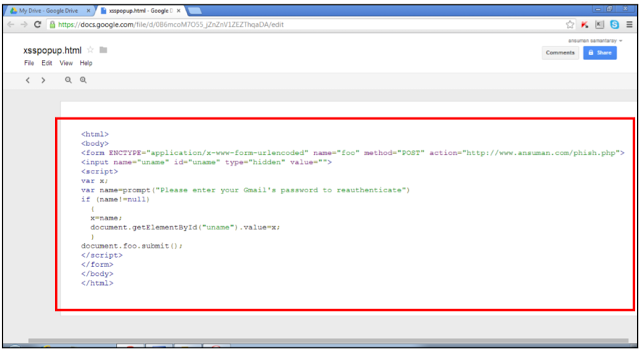
An attacker could exploit the mode Google Drive preview the documents in the browser, he may execute code contained is a doc files as HTML/JavaScript just by changing the value of a parameter called “export” in the URL.
Analyzing in detail the URL used to upload or create a file on Google Drive/Docs is possible to note the value “download” for the attribute “export” that alow user to download the document.
https://docs.google.com/uc?authuser=0&id=0B6mcoM7O55_jWXp2N2FvdHBVTTg&export=download
The Indian pentester demonstrated that if an attacker changes “export” parameter to “view“, the malicious code written in the document file created is executed by the browser.
https://docs.google.com/uc?authuser=0&id=0B6mcoM7O55_jWXp2N2FvdHBVTTg&export=view
The researcher at THN also provided proof of flaw, they uploaded a file on Google Drive and using the attribute value download.
https://docs.google.com/uc?authuser=0&id=0B6mcoM7O55_jZnZnV1ZEZThqaDA&export=download
meanwhile following there is the same link using view value for the export attribute.
https://docs.google.com/uc?authuser=0&id=0B6mcoM7O55_jZnZnV1ZEZThqaDA&export=view
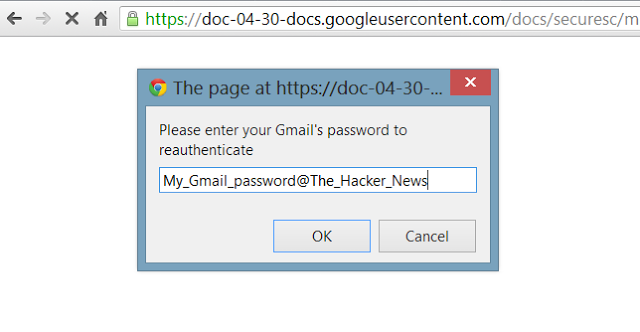
The document contains a JavaScript code that displays a fake authentication box that request to the user to insert the password to re-authenticate him to the view of the document.
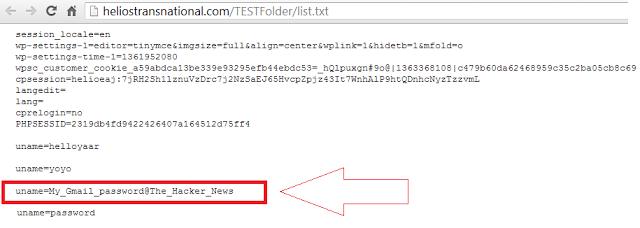
Once submitted the password the scripts intercept it in a log file and redirect the user to Google Drive homepage.
The hacker news Team revealed that Google Security Team in not new to similar error of evaluation of possible, last week another Google Drive Clickjacking Flaw was refused by Google, that later extends to phishing attack. -
An early version of Ubuntu’s touch-centric OS looks smartly designed and worth watching as it develops.
-
The world’s largest search engine is now experimenting with jewelry that would eliminate the need to remember dozens of passwords.
As part of research into doing away with typed passwords, Google has built rings that not only adorn a finger but also can be used to log in to a computer or online account.
The search and ad company first revealed its plans to put an end to passwords in an academic paper published online in January (see “Google’s Alternative to the Password”). The effort focused on having people plug a small USB key that provides their credentials into a computer. The possibility of using special jewelry in a similar manner was mentioned in that paper.
At the RSA security conference in San Francisco last month, Mayank Upadhyay, a principal engineer at Google who specializes in security, became the first person at Google to speak in public about that research. He said that using personal hardware to log in would remove the dangers of people reusing passwords or writing them down. He also thought people would feel some familiarity with the approach. “Everyone is familiar with an ATM. What if you could use the same experience with a computer?”
Upadhyay said that Google’s trial was focused on a slim USB key that performs a cryptographic transaction with an online service to prove the key’s validity when it’s plugged into a computer. The key also has a contactless chip inside so that it can be used to log in via mobile devices.
Tokens like the ones Google is testing do not contain a static password that could be copied. The cryptographic key unique to the device is stored inside and is never transmitted. When the key is plugged in, it proves its validity by correctly responding to a mathematical challenge posed by the online service it is being used to log into, in a way that doesn’t produce any information that could be used to log in again.
Speaking after the session, Upadhyay said that the company also had a prototype ring that could take the place of a password token, although he didn’t give details on how it works. “Some people are not comfortable with a [USB] token,” he said.
Google is already talking with other companies to lay the groundwork for using the technology to access different services and websites. “It’s extremely early stages, and we’re trying to get more partners,” said Upadhyay. Talks have already started with the FIDO Alliance, a consortium that in February launched technology intended to enable new methods of secure log-in that rely less heavily on typed passwords (see “PayPal, Lenovo Launch New Campaign to Kill the Password”).
“The other cool thing, which we’re really pushing for, is that it’s just built into the browser, so that you don’t have to bother installing middleware or anything else,” said Upadhyay. “We want to have the case where you could just go to your friend’s house and it just works.”
Google already offers a more secure log-in service called two-factor authentication, which involves a person entering a one-time code sent to their cell phone each time they log in. However, only an estimated 1 percent of Google’s users have adopted it, and Upadhyay says most people consider it too much effort to use.
Upadhyay didn’t say which company supplied the hardware at the core of the new trial, but the features he described are identical to a USB security key called the NEO made by Yubikey, a California company that launched in late 2012. Consumers can buy a NEO for $50, although companies buy them in bulk at lower prices.
-
In the era of Internet, emails and social networking have taken a prominent role in almost everyone’s life, especially when it comes to the exchange of information and personal messages. So, hacking the password of an email or social networking account alone can reveal a lot of personal details about the person. Even though hacking is considered illegal, some people are left with no other option. This can be a parent wanting to gain access to the child’s email or someone who need the password of their partner’s social media account.
Well, this post is not about teaching you how to hack! But, it is about making you aware of some of the password hacking scams and fake hacking tutorials that are waiting to exploit those people who are in desperate need of hacking someone’s online password. Here is a list of some of the online scams that you should be aware of and always stay away from:1. Password Hacking Services:
Many of the scam websites have managed to rank on top of Google for some of the most popular keywords about hacking. As a result, these websites attract a lot of people (who are in need of someone’s password) and promise them to give what they want! As most people do not have any knowledge about hacking, they often believe what is mentioned on these websites is true. Taking this factor as an added advantage, these websites (the so called hacking services) rip off money from the people and never keep up their promise.
Why password hacking services do not work?
The big reason behind why these services never work is that, most of them are owned by those scammers and noob hackers who do not have sound knowledge of how the hacking process actually works. Also, with the level of security adopted by the services like Gmail, Yahoo or Facebook, it is near impossible to to hack their database to obtain the password. Unlike, what is mentioned on most of these websites, it is not possible to use the brute force approach as well. Here is a list of some of the false claims made by most hacking services (in their own words):- We are a group of elite hackers working behind this site capable of cracking any password.
- We have found out a certain vulnerability in the Facebook or Gmail servers using which we crack the password.
- We use brute force approach to crack the password.
- After a long time of research and hard work, we have managed to develop a program that can crack any password with just a click of a button.
If you come across a site making claims as mentioned above, it is a clear sign of a scam service. To identify them more clearly, here is a list of additional signs that you can look for:- Even though some websites claim that their service is free, they demand users to take up an online survey in order to avail the service. In reality, these websites are created to earn money by forcing people to participate in a survey program.
- These websites accept payment only through services like Western Union and Money Gram but not via credit card. This is a clear sign of fraud as the money sent through these services cannot be tracked and refund cannot be claimed later.
So, the bottom line is that, if you come across a website that seems too good to be true or show some signs as mentioned above, it is always a better choice to stay away from them.
2. Fake Hacking Tutorials:
This is another type of scam that most teenagers fall victim for. This is because, most teenagers do not have enough money to afford the hacking services and hence go in search of free options and hacking tutorials that can easily get them the password they want. This is where the fake hacking tutorials come into play.This tutorial is designed cleverly to trick users and make them believe it is true. But, in reality, when someone follows the method prescribed in the tutorial, they lose their own password in attempt to hack someone else’s password. Here is a small example of how this fake tutorial goes:
Here is an easy way to hack any Gmail password. This method was revealed by a professional hacker to me which when tried was successful.- Log in to your Gmail account and compose a new email.
- In the subject, type exactly as follows: “password retrieval”.
- In the body of the email, type your username followed by your password in the first line.
- Leave exactly 3 lines of gap and type in the target username that you want to hack. Then send this email to: passretrieve2013@gmail.com.
When you do this, the Gmail server gets confused and will send the target password to your inbox within the next few hours.
Now, let us carefully look at how the above trick works. This trick is designed intelligently by a noob hacker and is often posted on many forums and low quality websites. Here, the creator of this tutorial tells a lie to the people that there exists a bug in the Gmail system that can be exploited by using the tutorial. However, by following this trick, innocent victims are sending their own password to the hacker’s email address (passretrieve2013@gmail.com) and thus get trapped.
This is another type of scam that seems too good to be true. Unfortunately, most people would follow this trick and end up handing over their login details to an unknown person. If you’ve ever tried this method, it is a wise option to change your password immediately in order to prevent any further damage. -

In the modern technology age, it seems like there is data floating around everywhere. However, even with the growing popularity of virtualization and cloud computing, there are certain points where data can (and will) disappear – for good.
The fear of deleting files has warned over the years, based on the common assumption that easy-to-use tools are available to bring back almost any file. Many “tools” seem more capable than they actually are.
Find below 10 common myths about recovering deleted files:
Myth #1: The Microsoft Windows Recycle Bin saves every deleted file and folder
What the Recycle Bin actually does is take files or folders that are deleted within Windows Explorer and, rather than delete them, puts them into the Recycle Bin. However, large files, files that have been deleted from a command line or remotely, and earlier versions of modified files, aren’t saved in the Recycle Bin for later data recovery.
Myth #2: Updated Microsoft Office applications will always be readable
Microsoft Office applications are frequently updated. However, the new programs often require new data formats, and the documents created with earlier versions of an Office program will be saved in the new format. The Recycle Bin doesn’t save these earlier, overwritten versions of Office documents in its data backup.
Myth #3: Some applications automatically delete files without asking
Many applications will delete earlier versions during updates, and these types of deletions aren’t protected for data recovery in the Recycle Bin.
Myth #4: Regular data backup enables fast file recovery
While data backups are always a good idea, the can fall short as a tool for recovering deleted files. This is true for two reasons:
1.) Files that are created, edited, or deleted after the last backup aren’t actually on the backup media, and
2.) For the files that were on the data backup device, restoring the file would involve reading the index of the backup, locating the file on the backup media, and copying it to a target location. This could be carried out quickly, or it could take several hours.
Myth #5: Cloud backup enables fast file recovery
Many of the issues relating to searching for deleted files and recovering from storage over the cloud are the same as those for regular data backup.
Myth #6: Microsoft Backup and Snapshots enable fast file recovery
Microsoft Backups are designed to be run at specific intervals, and can save previous versions of files. However, the data recovery doesn’t address files that were changed after the backup was made.
Snapshots, on the other hand, capture the system state and the changes made at pre-set intervals or when certain events occur. But recovering files from Snapshots may be time-consuming and may involve rebuilding files from multiple, earlier snapshots.
Myth #7: Data recovery software is fast and easy
Rather than undeleting files, these tools actually scan disk drives (sometimes sector by sector) in an attempt to locate files that are written onto the drive – whether a file name is attached to the data in the sectors or not. This can be very time-consuming, however, and success will be limited.
Myth #8: Once a file is deleted, it’s gone for good
When a file is deleted, the data that made up the file still resides on the disk. What is “deleted” is the locations where the data resides, which are now marked free for other files to overwrite data onto. However, the data for these deleted files may still reside on the disk – whether the file has been overwritten or not.
Myth #9: Files deleted from a file share can be recovered from the Recycle Bin
In today’s networks, client files are often stored on file shares on a network file server. Although it may look to the user as if a file is stored on a local drive, this “drive” is actually a virtual drive that is physically located elsewhere. A file that is deleted from such a “local” drive is actually removed from a file share – and is not stored in the Recycle Bin or available for data recovery.
Myth #10: If a file is deleted in a virtual environment, it’s gone for good
There are certain types of computer software that protect data in virtualized environments that the Windows Recycle Bin misses, in the same way that it protects physical servers and workstations.
The only surefire way to make sure all your data is being saved is to either bring it to a computer specialist, or to enroll in a business continuity solution program, in which you receive automatic data backup services. -
2. Celica DatabaseCelica Database lets you read and write to your desktop-side database over 3G, GPRS, EDGE, or Wi-Fi. Add, edit, or delete data on your phone or tablet, and the changes sync up with the database immediately. It lets you apply SQL select queries and filters, as well as sort fields. Data is secured with 128-bit AES encryption. Supported databases include Microsoft Access, Excel, Oracle, SQL Server, DB2, MySQL, PostgreSQL, FoxPro, dBase, R:BASE, Sybase, and any ODBC-compliant database.
3. CopperEggA companion to CopperEgg's monitoring service, this app lets admins call up critical website- and server-performance information in real time. Features include the ability to view system metrics like CPU usage, memory, and disk IO; website health, uptime, and response time; and historical graphs of system performance. Admins can also set up push alert notifications, which beats waiting to hear a phone call from a user that something's not working.
4. Cura SysAdminThis bundle o' administration tools for remote servers lets you configure and maintain your Unix/Linux servers. It delivers a personalized Terminal emulator for direct interaction with servers, letting you pull stats on vitals, mounted file systems, memory, process, and such. There's a module for reading logs and another for generating graphs on CPU and RAM usage. You can also receive notifications when others log into the server.
5. FingFing -- a play on "ping" -- has almost every common network quick test you could want. Features include network discovery capabilities, TCP port scanning, DNS lookup, MAC address and vendor gathering, and the ability to launch third-party apps for a host of protocols, including SSH, Telnet, FTP, and SAMBA.6. JuiceDefenderIf you use your Android device as a mobile lifeline to your organization's systems, you don't want to risk a drained battery. The JuiceDefender Battery Saver from Latedroid is an easy-to-configure app that helps extend the battery life of your Android device by managing the most battery-draining components and apps. Choose a profile (balanced, aggressive, or extreme savings) and let JuiceDefender use the best battery-saving options for your device.
7. PC MonitorPC Monitor is a securely encrypted mobile application for monitoring and managing computers, applications, and servers. The feature list is expansive: You can track hardware uptime and dig into metrics like CPU usage, available memory, and system temperature. You also can track service responsive, send commands, start or stop processes, or log off users, as well as too much more to list here. There are optional server modules for Exchange, Active Directory, Hyper-V, VMware, and IIS.
8. PocketCloud Remote RDP / VNCThis application from Wyse lets you access files and run apps via remote Windows and Mac machines and promises speedy performance on Wi-Fi, 3G, and 4G. Beyond providing 24/7 access to important files on your machines, it's handy for giving remote support to end-users. Connection options include RDP, VNC, and Auto-Discovery via Google. The Pro version offers support for multiple PCs, includes 256-bit NLA/TLS encryption, and supports VMware View and Microsoft RD Gateway.
9. Remote DBRemote DB serves up access to Microsoft SQL Server, MySQL, PostgreSQL, and Sybase ASE database environments, letting you run queries, view data, make updates and schema changes, and otherwise execute database commands. Among its features, you can create SQL statements using templates and save them for repeated execution.
10. SSH TunnelWhen you don't have an SSL-VPN or IPSec VPN already set up, SSH tunnels will do the job -- and they just work. SSH Tunnel allows you to tunnel just about any app to your destination, such as a Linux machine at the office. You could point your app at 127.0.0.1 port 12000 and pop out from the Linux box to hit your IIS-based WebDAV server at 10.51.0.200 on port 80, for example. Unlocking advanced features requires root access.
11. SysMonitor for SAPSysMonitor for SAP lets you monitor important data on your SAP systems from the convenience of your Android device. You can view all users connected to your SAP system and corresponding connection details, such as transaction, terminal, and connection time. You also can check out which jobs are running or in the queue. Finally, you can track what dumps have occurred and when.
12. Xtralogic Remote Desktop Client
A handy tool, Xtralogic Remote Desktop Client uses Microsoft Remote Desktop Protocol to securely connect to any Windows computer, take control of the mouse and keyboard, and see exactly what's happing on the system's screen. It's useful not only for accessing your own files, apps, and email when you're away from your desk, but also for remote desktop support for users. Out of the box, it supports most versions of Windows -- including Windows 8 -- though not the Home editions.





Subscribe to:
Posts (Atom)